

If your site already shows up in Google, your first choice should be Google Search Console. It is the only free keyword tool here that shows the real searches your pages appear for. If your site is new, collect phrases from Google’s search suggestions, compare them in Google Trends, then check demand in Google Keyword Planner. Save the free versions of SEO tools for last, since most allow only a few searches.
We tested the 12 free keyword tools for small websites on 9 November 2026, using a house cleaning company in the United States as the example. The screenshots below come from those tests.
Comparison of the top free small business websites keyword research tools
| Rank | Tool | Best for | Account needed? | Free limit we saw |
| 1 | Google Search Console | Finding searches you already appear for | Yes, plus a verified site | No limit |
| 2 | Google Keyword Planner | Checking demand with Google’s own data | Yes, a Google Ads account | No limit shown |
| 3 | Semrush free Keyword Tool | The most ideas with full numbers in one search | No | 3 searches |
| 4 | SE Ranking | The most detail on a single phrase | No | 5 lookups |
| 5 | Google Trends | Choosing between phrases and spotting seasons | No | No limit |
| 6 | Google autocomplete and “People also ask” | Collecting the exact words customers use | No | No limit |
| 7 | Ahrefs Free Keyword Generator | Quick ideas with no limit | No | None shown |
| 8 | Moz Keyword Explorer | A second opinion on volume and difficulty | No | 3 searches a day |
| 9 | AnswerThePublic | Questions people ask about a topic | No for 1 search | 1 a day, 3 with a free account |
| 10 | Ubersuggest | One quick check | No for 1 search | 1 search, 3 a day with a free account |
| 11 | keyword.io | Long lists of phrasing ideas | No | None shown, export needs an account |
| 12 | Answer Socrates | Ideas grouped by buying stage | No for a few searches | 3 a day with a free account |
How we ranked the tools
We ranked each tool on three things that matter to a small business with limited budget:
- how trustworthy its data is,
- how much useful information you get without paying, and
- how far the free version goes before it stops.
Search Console and Keyword Planner come first because their data comes from Google itself.
The rest are ordered by how much useful information they gave us per free search. That is why Semrush and SE Ranking sit above Google Trends and autocomplete. Trends gives relative scores, while autocomplete gives no numbers at all.
The best free keyword research tools for small business websites
1. Google Search Console
Best for: sites that already get some traffic from Google.
Every other tool on this list estimates what people might search. Search Console shows what actually happened: the searches where your pages appeared, how often, and how often people clicked. That makes it the best place to find phrases you are already close to winning.
- Open Search Console and choose your site.
- Select Performance in the left menu. The report opens on the last 3 months of Web search data.
- Tick Average position so it shows next to total clicks and impressions.
- Scroll down to the table and select the Queries tab.
- Sort by impressions. Look for searches with lots of impressions, few clicks and an average position below the top few results. Google already links your page to these searches.
- To look at one topic, select Add filter and filter for queries that contain a word, such as “clean”. If you only serve US customers, add a country filter too. Search Console recently updated its country filter so you can combine several countries in one view.
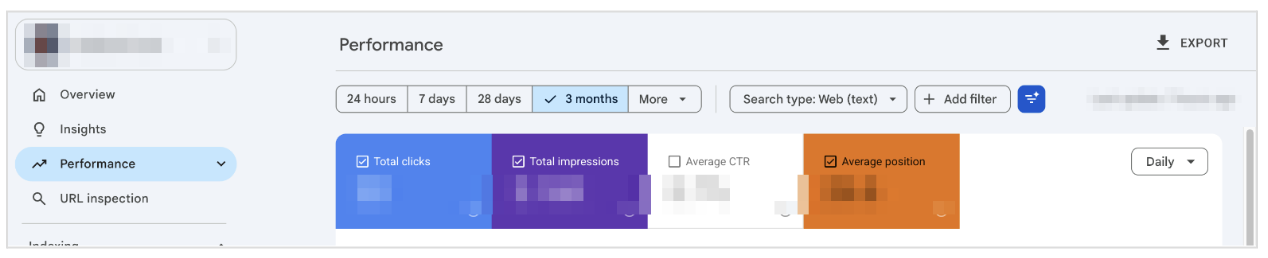
The Performance report in Search Console. The site name and figures are hidden.
Limits: Search Console doesn’t list every search. Google leaves some out to protect people’s privacy and keeps only the most important rows (read more: Search Console Help). Once you add a query filter, those hidden searches drop out of the totals as well. It also can’t show your position inside AI Overviews. And a brand-new site won’t have much here yet.
2. Google Keyword Planner
Best for: checking whether people search for a phrase, using Google’s own data.
Keyword Planner sits inside Google Ads and was built for advertisers. You can still use it for organic research, and you don’t have to run an ad.
- Sign in to Google Ads.
- Go to Tools, then Planning, then Keyword Planner.
- Select Discover new keywords and type up to three of your phrases.
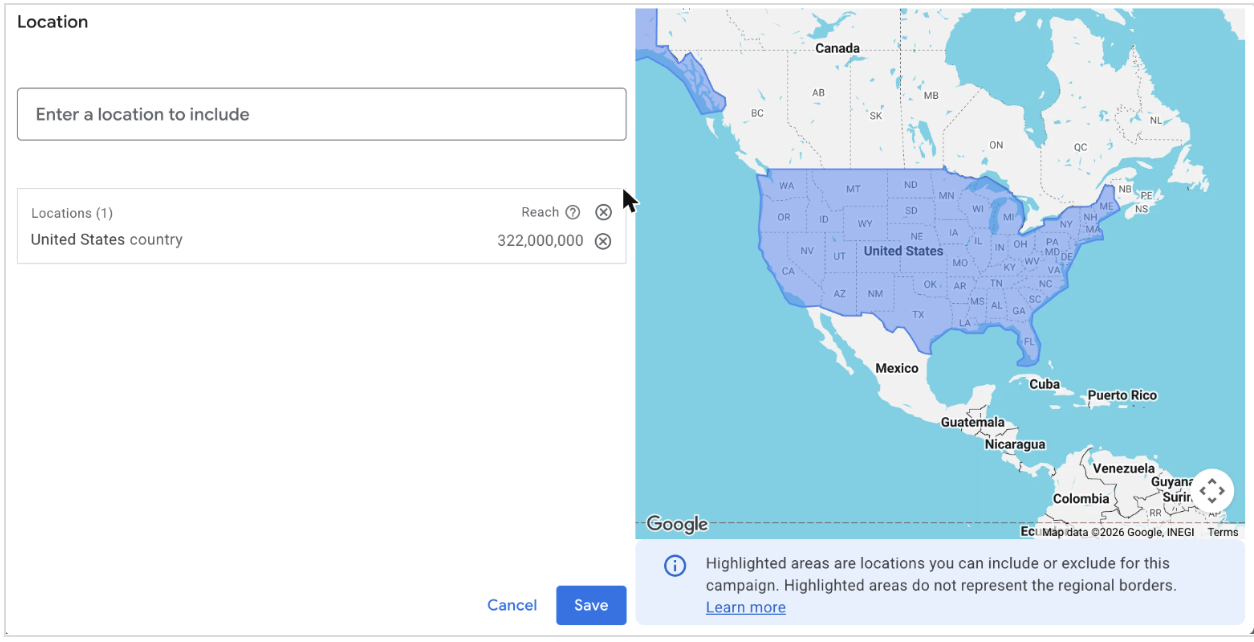
- Check the location under the search box. Keyword Planner uses your account’s home country by default, and it switched back to it each time we started a new search.
- Select the location, remove the country that’s there (if required), type the country where you wish to identify the keyword search volume or area, and select Save.
- Select Get results and read the Avg. monthly searches column.
Our test account wasn’t running any ads, so we saw ranges, not exact numbers. “house cleaning service” showed 10K to 100K searches a month, and “how often should you deep clean your house” showed 100 to 1K.
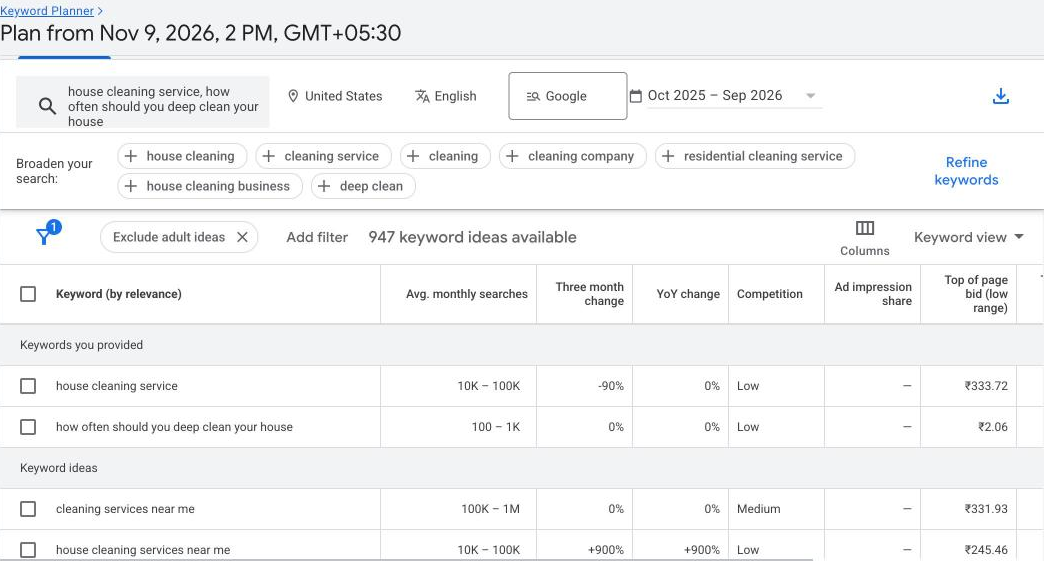
Keyword Planner results for the United States. Account details are hidden.
For a small site, ranges are enough. You mostly need to know whether people search for a phrase at all, and which of two phrases is more popular. The bid columns show in your account’s currency, so don’t be surprised if they aren’t in dollars.
Limits: Google says a new account has to finish setup, including billing details, before Keyword Planner will show new keyword ideas. Adding a card doesn’t start an ad, but check that no campaign is switched on before you leave. Keyword Planner also leaves out some very low-volume phrases and anything it treats as sensitive, so a missing phrase doesn’t mean nobody searches for it.
3. Semrush free Keyword Tool
Best for: the most ideas with full numbers from a single search.
Semrush’s free Keyword Tool page works without signing in and allows three searches. One search showed the first 15 of more than 10,000 related phrases, each with volume, difficulty, intent and cost per click.
For “house cleaning service” it showed 22.2K searches and a difficulty of 34. Similarly, the keyword “professional house cleaning services near me” showed a search volume of 14.8K and a difficulty of 50.
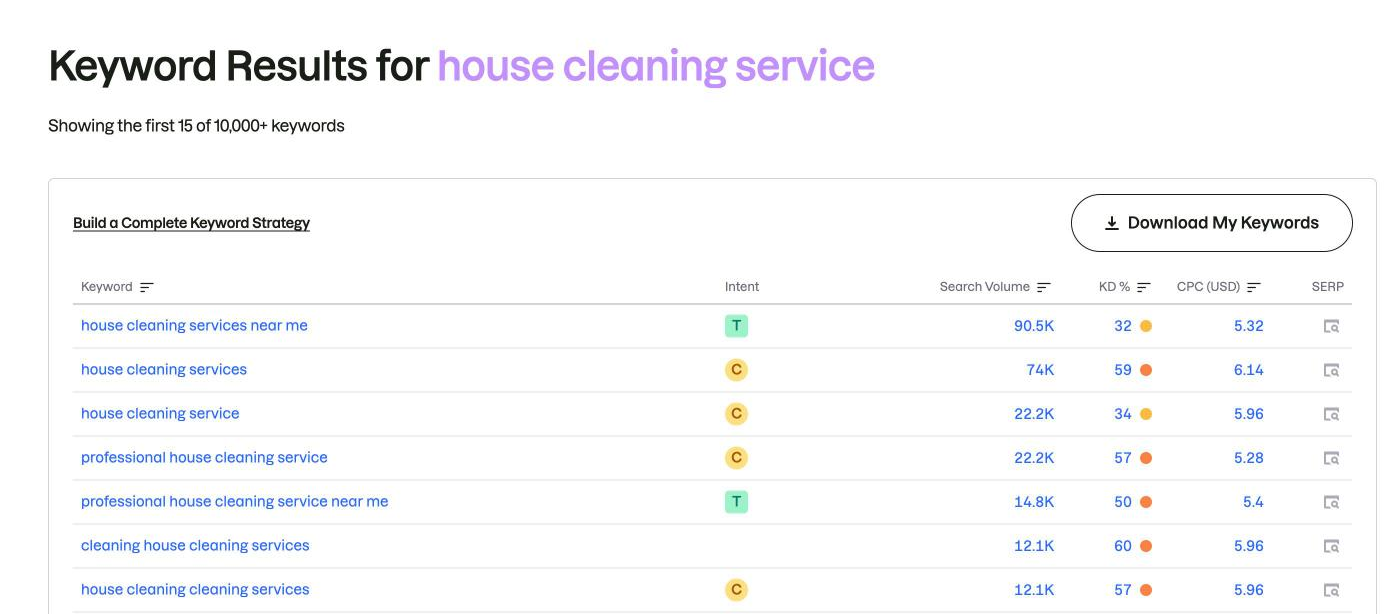
Semrush’s free Keyword Tool, signed out.
Limits: after three searches the counter read 0/0. Going straight to the full Keyword Magic Tool brings up a sign-up box instead of results.
4. SE Ranking
Best for: a detailed look at one phrase.
SE Ranking gives you five lookups without an account. One lookup gave us the most detail of any tool: volume (47.5K), difficulty (65 out of 100, “Not easy”), intent (Local and Commercial), cost per click ($3.60), a monthly volume chart and lists of similar phrases and questions.
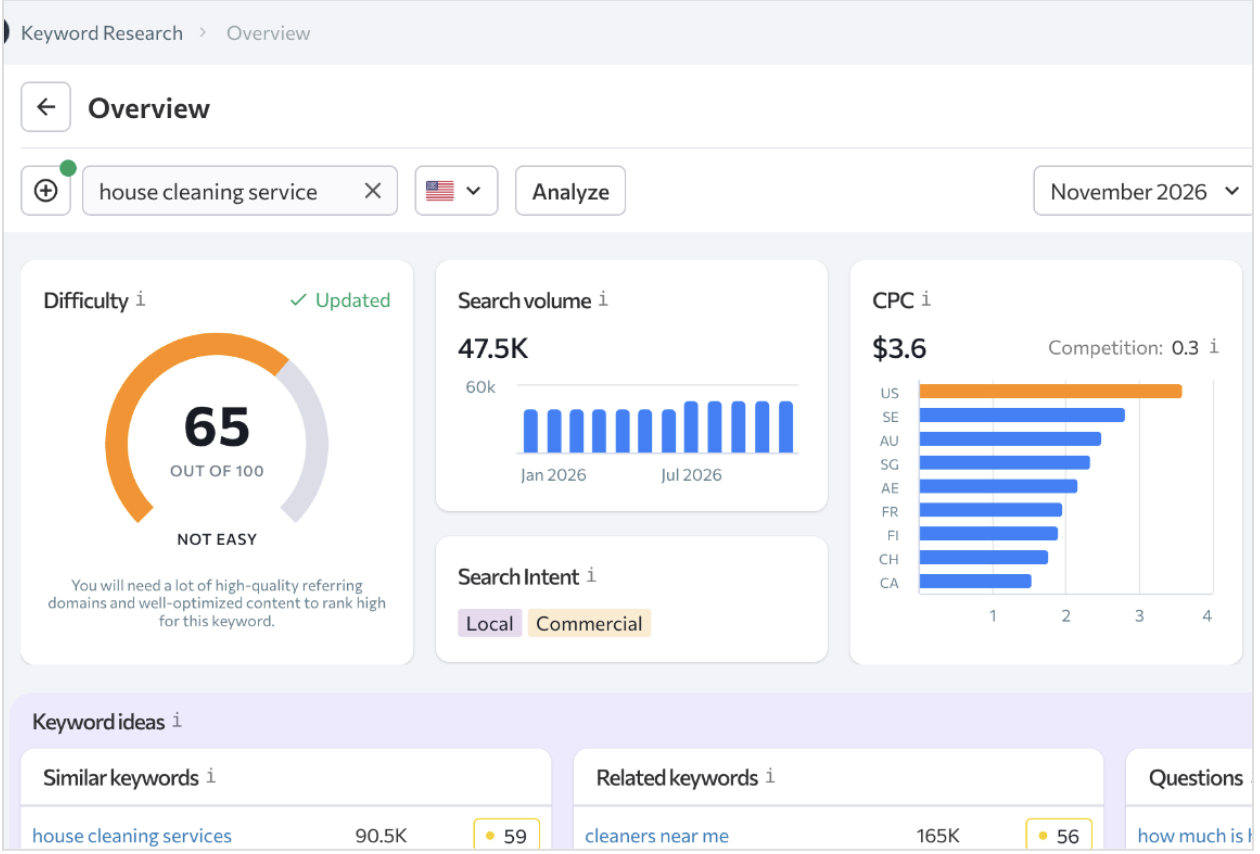
SE Ranking, signed out, United States.
Limits: five lookups, so save it for the phrases you are most likely to target.
5. Google Trends
Best for: choosing between two ways of saying the same thing, and spotting seasonal peaks.
Google Trends is a free keyword tool that lets you find search terms by time, location, and popularity.
You can compare two or three phrases over the past 12 months in your country. Trends gives each phrase a score from 0 to 100 based on interest, not a count of searches.
In our test, “house cleaning” averaged 53, “deep cleaning” 25 and “maid service” 8. “Deep cleaning” jumped at the end of March, and “house cleaning” peaked in mid June.
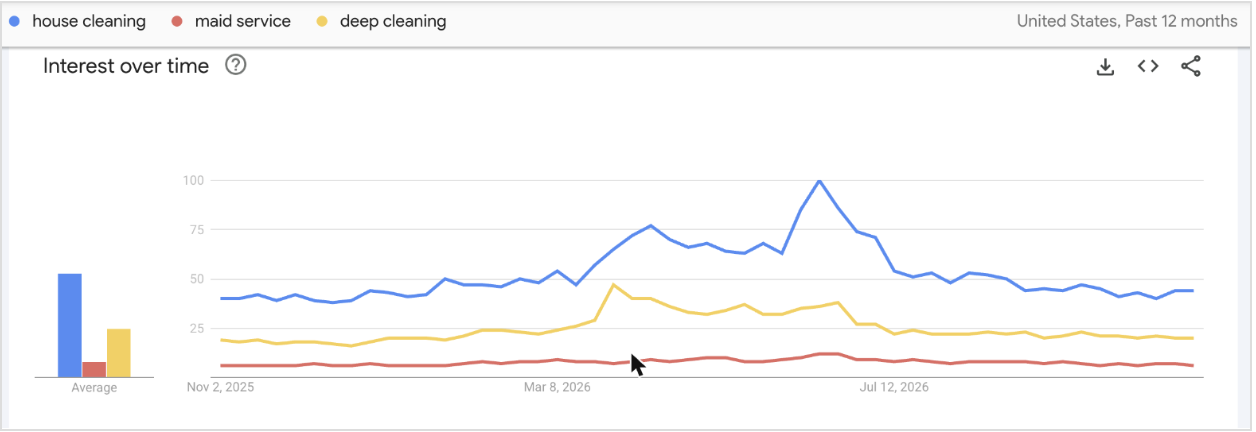
Google Trends, United States, past 12 months.
So most people say “house cleaning”, not “maid service”, and spring is the time to publish anything about deep cleaning.
Limits: be careful with the “Rising” related searches. Ours included “deep learning tutorials”, which has nothing to do with cleaning. Search Engine Watch’s 4-country Google Trends test covers more of these pitfalls.
6. Google autocomplete and “People also ask”
Best for: collecting the exact words and questions your customers use.
The prediction of the complete search phrase that Google makes when you type into its search bar is called Autocomplete.
Type your service into the Google search box slowly and write down the suggestions. Then search one of your customers’ questions and read the “People also ask” box.
For “how often should you deep clean your house”, Google showed four related questions. Questions like these make good subheadings or short help pages.
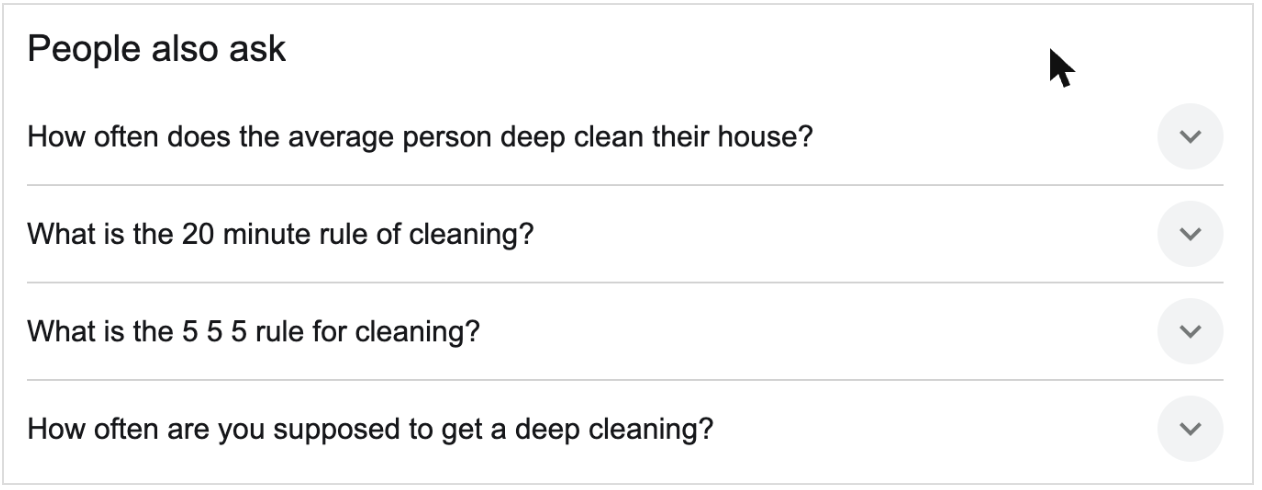
“People also ask” for a US search about deep cleaning.
Limits: Google shows no search numbers here. Its suggestions come from real searches and depend on the searcher’s language, location and trending topics, plus their own search history if they are signed in. So search from the same area as your customers. If you are researching a market you are not in, use a tool that lets you choose the country, such as keyword.io (number 11).
7. Ahrefs Free Keyword Generator
Best for: quick ideas with no account and no limit we could find.
Ahrefs offers a free keyword generator to discover search terms from its database of over 8 billion queries. It lists 20 ideas per search, with volume shown as ranges like “more than 1,000” and difficulty labels for the first 10. For “house cleaning service” it showed more than 100K searches and rated it “Easy”.
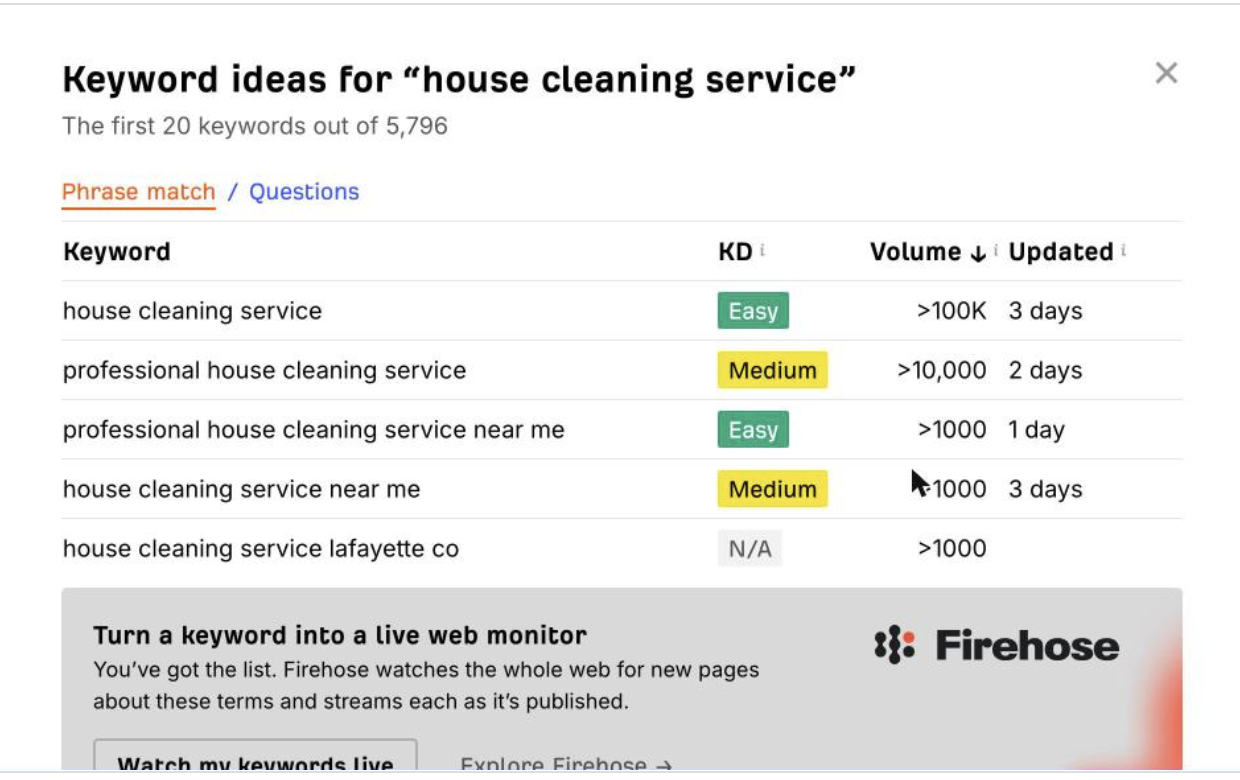
Ahrefs Free Keyword Generator
Limits: only 20 ideas per search, and no exact volumes.
8. Moz Keyword Explorer
Best for: a second opinion on volume and difficulty.
Moz works without an account, with a limit of three searches a day. It shows volume (13.6K), an estimate of how many clicks go to normal search results (59%), a difficulty score (39, “Low”) and a short list of suggestions.
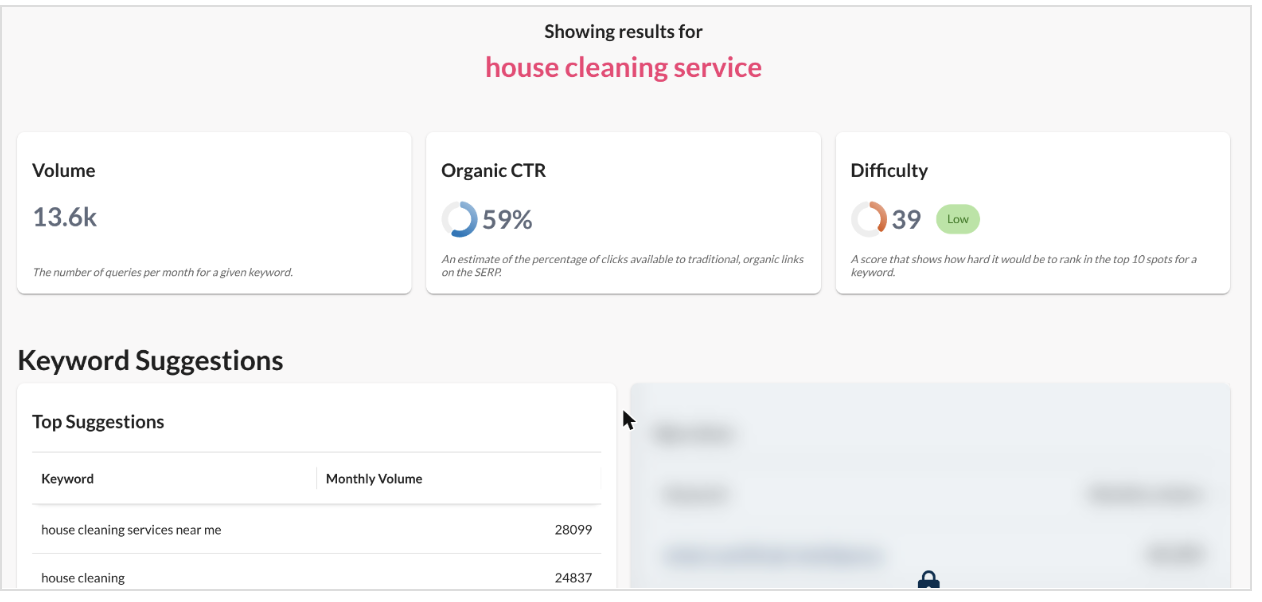
Moz Keyword Explorer, signed out.
Limits: most suggestions are locked without an account.
9. AnswerThePublic
Best for: finding the questions people ask around a topic.
AnswerThePublic takes one starting phrase and builds a report of related searches and questions. Before you search, check the country and language next to the search box.
For “house cleaning service”, the report showed 90.5K searches a month and $12.10 a click for the main phrase. Those are the same figures Ubersuggest gave us, because both tools belong to NP Digital. Below that, the report breaks the topic into sections. The most useful for a small business were these two.
Organic Searches lists related phrases with their own volume and cost per click. The free version showed 10 of 271 phrases, including “house cleaning service near me” at 60.5K searches and “house cleaning service nyc” at 22.2K. The rest were blurred out until you register.
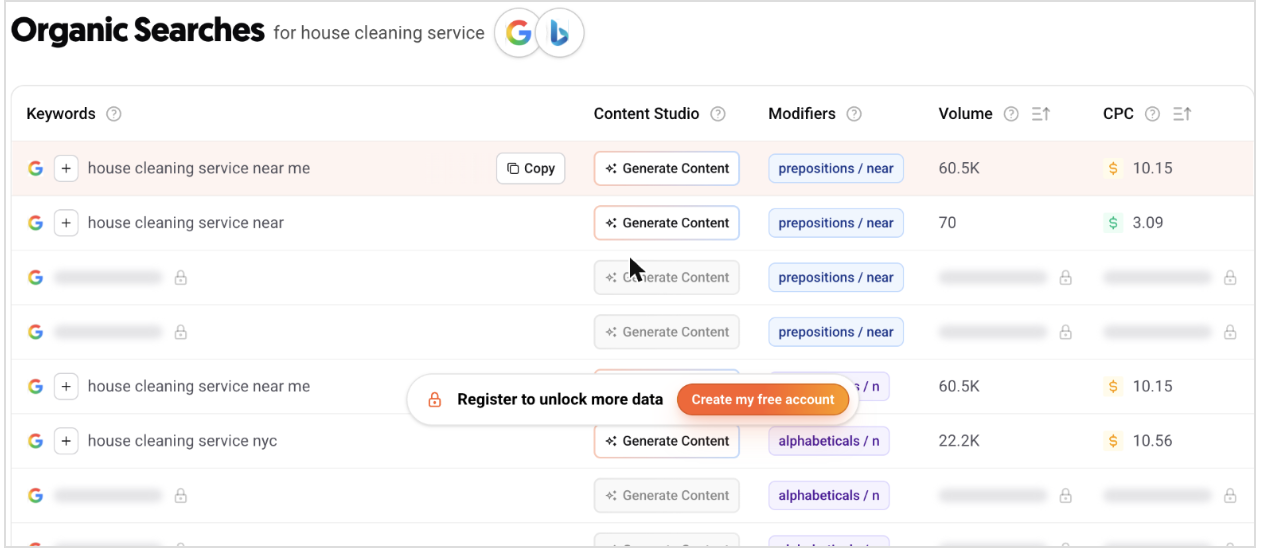
AnswerThePublic’s Organic Searches table, signed out.
Locked rows need a free account.
People Also Ask collects the questions Google shows for your topic. Ours included
- “How much is house cleaning per room?”,
- “Should I tip my house cleaner?” and
- “Is $50 an hour too much for house cleaning?”.
Questions like these make good FAQ entries or short help pages for a cleaning business.
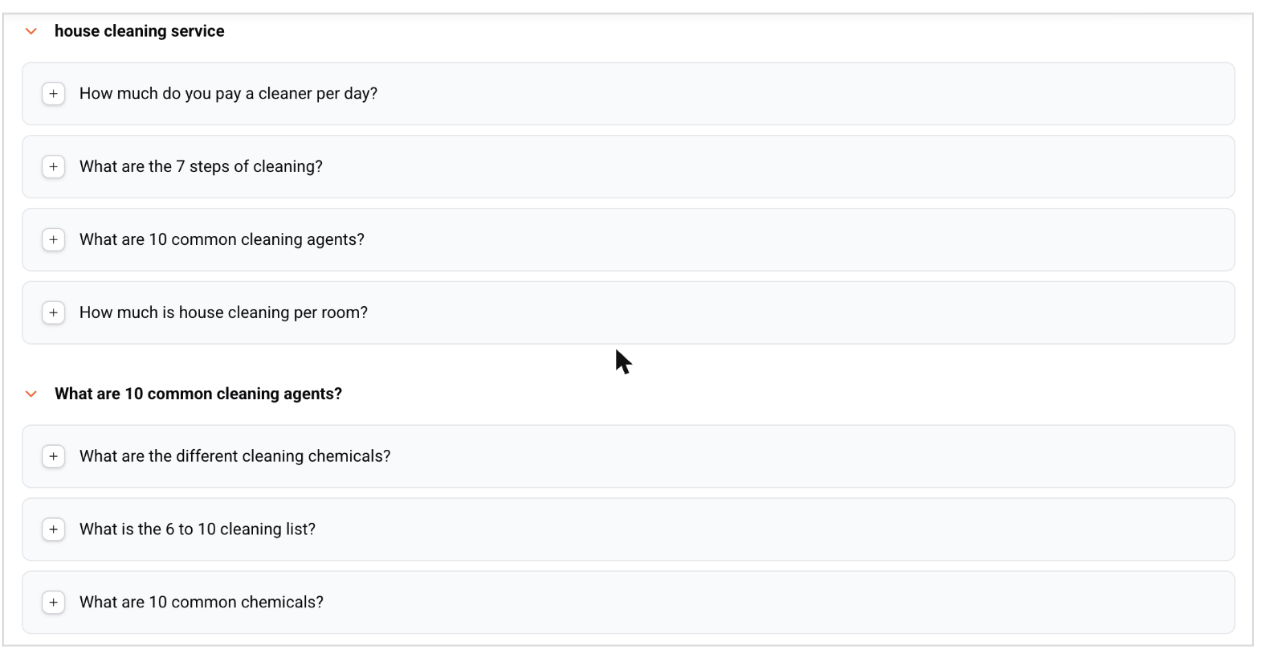
AnswerThePublic’s People Also Ask list for “house cleaning service”.
Not every question fits. Ours also included “What are 10 common cleaning agents?”, which is good for a cleaning products site, not a cleaning service. Pick the questions your customers would actually ask before they hire you.
Limits: one search a day without an account. The tool offered three free searches a day with an account, no credit card needed. Many rows stay locked even then, and AnswerThePublic’s free accounts have extra export restrictions, so plan to copy the phrases you want by hand.
10. Ubersuggest
Best for: one quick check.
Ubersuggest is another popular free keyword research tool for small businesses. It gave us one search without an account. The tool returned 90.5K searches, a difficulty of 38 (“Medium”) and a cost per click of $12.10, the same volume and cost per click as AnswerThePublic.
That’s no coincidence: both tools belong to NP Digital. Search Engine Watch’s Ubersuggest review covers the paid version.
With the location set to the United States, the Keyword Ideas report listed 352 autocomplete ideas, plus tabs for related phrases, questions, prepositions and comparisons.
Each idea came with its own volume and cost per click. City versions sat near the top, such as “house cleaning service chicago” at 40.5K and “house cleaning services san diego” at 6.6K, which is exactly the kind of local phrase a small cleaning company can target.
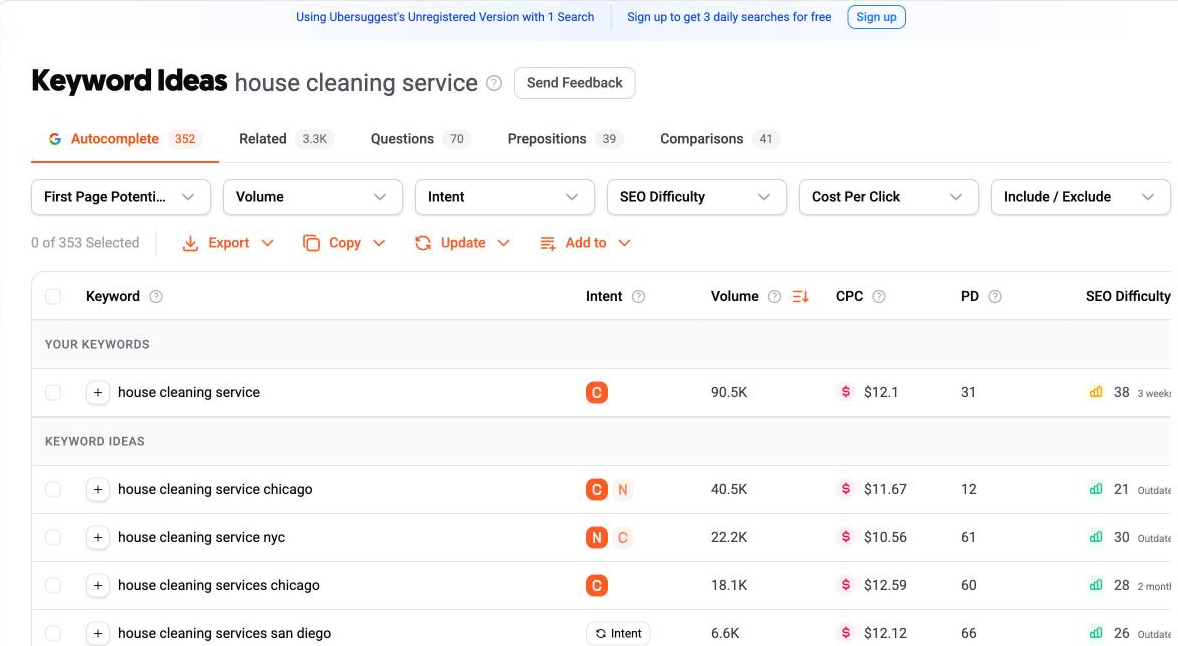
Ubersuggest’s Keyword Ideas, signed out, United States.
Limits: when we came back, it asked us to sign up. A free account gets three searches a day.
11. keyword.io
Best for: long lists of phrasing ideas for a country you choose.
Keyword.io is another leading free keyword tool for small websites. It generates up to 750+ long-tail keyword suggestions for every search term. You pick a source, such as Google, type your phrase and choose a country.
For “house cleaning service” on Google in the United States, it returned about 570 phrases.
The list is full of the kind of local searches a small business needs:
- “house cleaning services near me”,
- “house cleaning services near me prices”,
- and city versions such as Chicago, Los Angeles, Houston, San Diego and Austin.
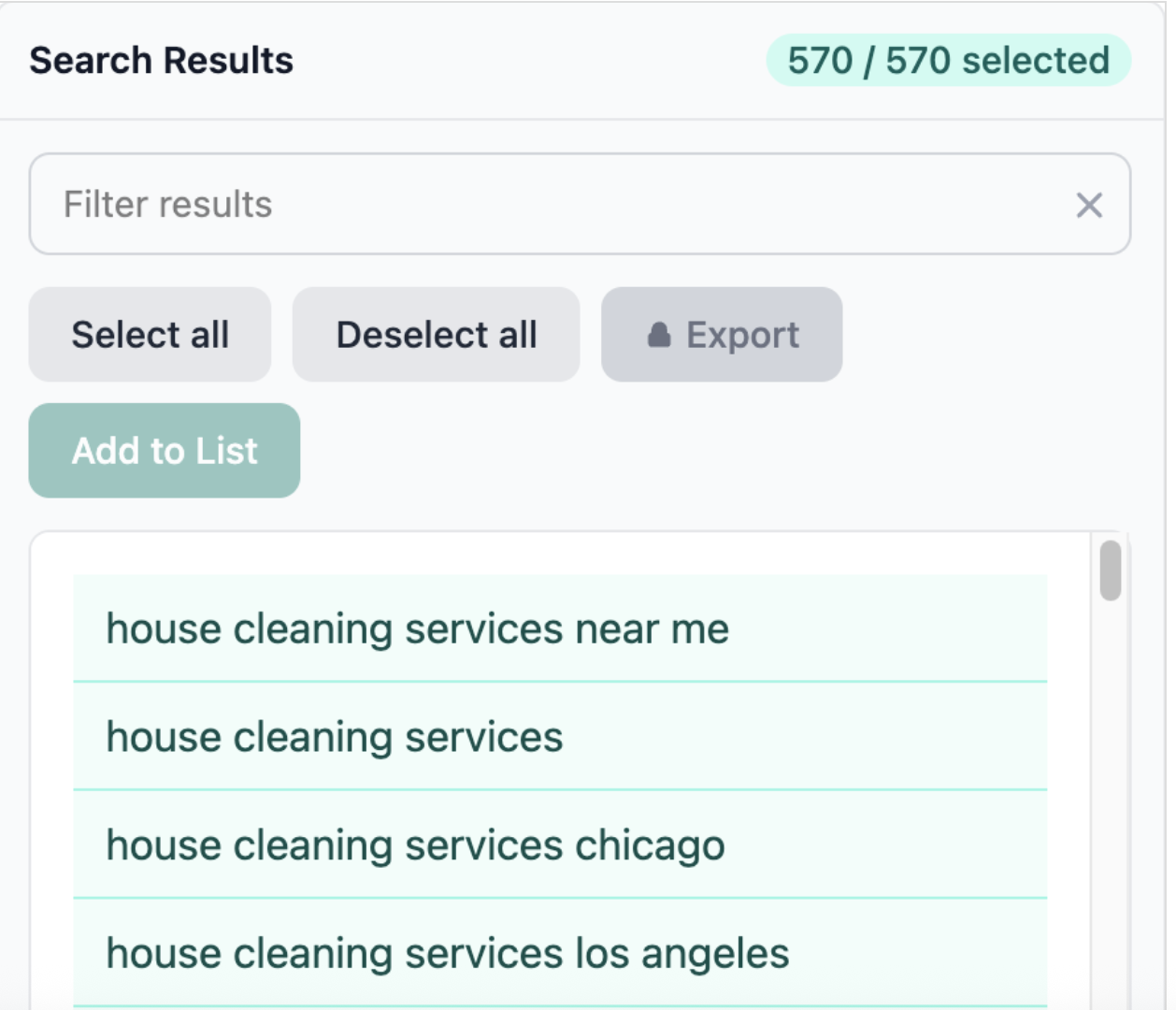
keyword.io, signed out: the first phrases in a list of 570.
That’s useful in two ways. City phrases show which local searches exist, so an Austin cleaner can confirm people search “house cleaning services austin”. And phrases like “near me prices” point to pages worth having, such as a prices page. Use the Filter results box to narrow the list, for example to “price” or “cost”.
Limits: no search volumes, so check the phrases you like in Keyword Planner or a free SEO tool. Export is locked until you create a free account, so without one you’ll need to copy phrases by hand.
12. Answer Socrates
Best for: ideas sorted by how close the searcher is to buying.
Answer Socrates is a keyword research+question generator tool. The software uses a single seed keyword to return hundreds of search terms covering long-tail, question keywords, comparison searches, and People Also Ask queries.
For our search, the tool returned about 30 phrases sorted into early-research, comparing and ready-to-buy groups.
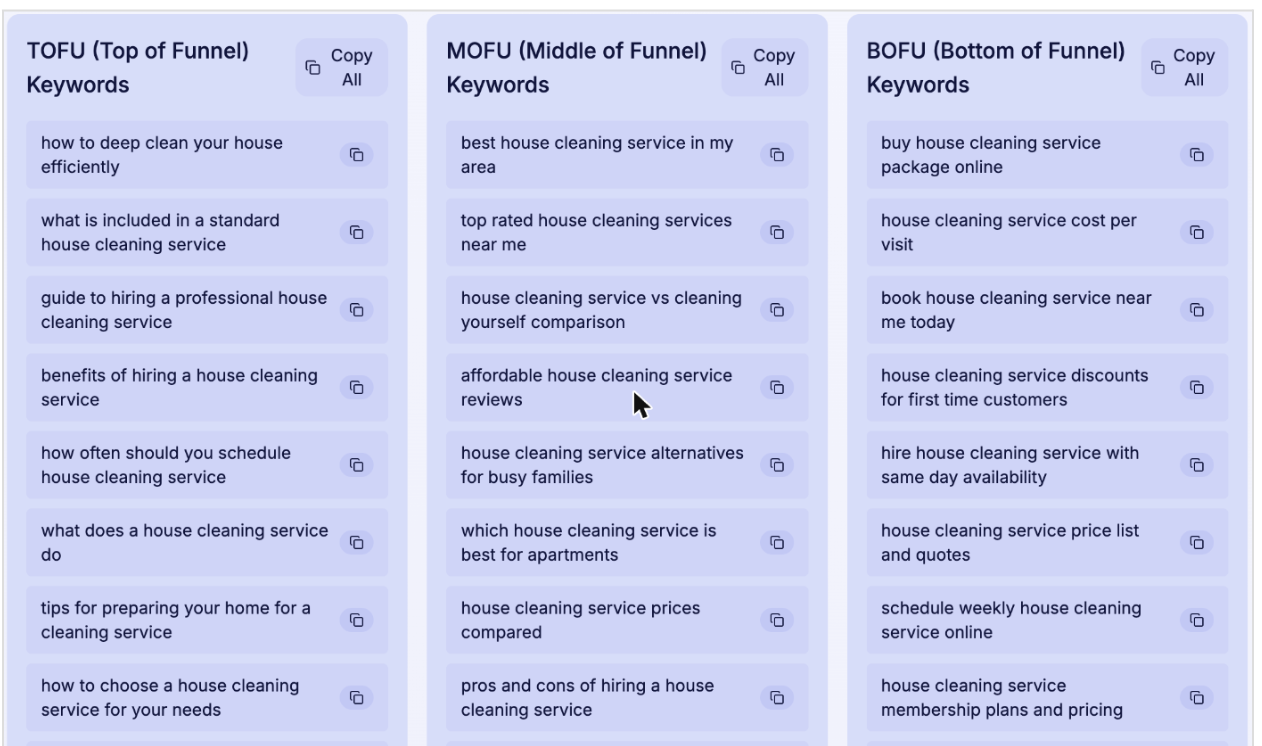
Answer Socrates sorts phrases into top, middle and bottom of funnel.
Limits: no search volumes, and you get only 3 searches before it asks you to sign up. Also, the tool uses AI on top of Google’s suggestions, so check that real people search for a phrase before you build a page around it.
Why the tools disagree
We looked up the same phrase, “house cleaning service” in the US, in six tools:
| Tool | Monthly searches | Difficulty |
| Google Keyword Planner | 10K to 100K | Not shown (its “Low” competition rating is about ads) |
| Moz | 13.6K | 39, “Low” |
| Semrush | 22.2K | 34 |
| SE Ranking | 47.5K | 65 out of 100, “Not easy” |
| Ubersuggest | 90.5K | 38, “Medium” |
| Ahrefs | More than 100K | “Easy” |
The volume estimates range from 13.6K to more than 100K, more than seven times apart. The difficulty ratings run from easy to not easy. Each company uses its own data and its own formula. So compare phrases within one tool, never across tools, and treat difficulty scores as a rough guide.
How to use them together
If your site already gets traffic from Google:
- Use Search Console to find searches you already appear for.
- Check demand for new ideas in Keyword Planner
- Then use one or two free searches in Semrush or SE Ranking on your final shortlist.
If your site is new:
- Collect phrases from Google’s suggestions
- Compare them in Google Trends
- Check demand in Keyword Planner
- And, save the free SEO tools for the five to ten phrases you are most likely to target.
Example: a house cleaning company in Chicago
The business is made up. The phrases and numbers come from our keyword tool tests.
A two-person house cleaning company in Chicago, has a new five-page website and almost nothing in Search Console yet. The owner collects phrases from Google, compares them in Trends, checks them in Keyword Planner, and uses one free Semrush search to look for local versions.
| Phrase | Where it came from | What we saw | Decision |
| house cleaning service | Starting phrase | Keyword Planner: 10K to 100K | Use on the home page, with “Chicago” |
| house cleaning services chicago | Ubersuggest | 40.5K | Use on the home page and in the page title |
| house cleaning services near me | Keyword Planner idea | 10K to 100K | Cover with a clear service-area page |
| house cleaning service cost | Ahrefs idea | More than 100K | Write a prices page |
| how often should you deep clean your house | Starting question | Keyword Planner: 100 to 1K | Write one helpful article and publish it before spring |
| What is the 5 5 5 rule for cleaning? | People also ask | No number | Answer it inside that article |
| cleaning services near me | Keyword Planner idea | 100K to 1M | Skip for now: it also covers office and commercial cleaning |
| deep learning tutorials | Trends “Rising” | Breakout | Ignore: not about cleaning |
The biggest number didn’t win. “Cleaning services near me” had the highest range, but plenty of those searchers want office cleaning, which this business doesn’t do. Fit and intent shaped the list.
The numbers only confirmed that people search for the phrases that were left. If the company started cleaning offices, that phrase would go back on the list. For more on turning narrow searches like these into pages, see Search Engine Watch’s guide to long-tail keywords.
Common problems
| Problem | Likely cause | What to do |
| Search Console shows only a few searches | Your site is new or gets little Google traffic | Use Google’s suggestions and Trends, then check again in a few months |
| Filtered totals in Search Console are lower than the chart | Hidden searches drop out when you add a filter | Use filters to find phrases, not to add up traffic |
| Keyword Planner shows the wrong country | It uses your account’s country and resets on each new search | Change the location every time before you select Get results |
| Keyword Planner shows only wide ranges | Your account isn’t running ads | Use the ranges to compare phrases. Don’t pay for ads just to get exact numbers |
| Autocomplete suggests the wrong city | Suggestions follow where you’re searching from | Search from your customers’ area, or use a tool where you can choose the country |
| Tools disagree on volume or difficulty | Each one uses its own data | Compare phrases within one tool only |
| A free tool stops working halfway through | You have used up its free searches | Use Google’s tools first and save free searches for your final shortlist |
What free tools can’t tell you
Free tools show which phrases people use and roughly how often. They can’t tell you whether your page will rank, how many visitors it will bring, or whether those visitors will become customers. Treat your shortlist as a list of pages worth writing, not a traffic forecast. A few months after those pages go live, check Search Console to see which searches they actually show up for.
How we tested
We ran every tool on 9 November 2026 in Chrome, with US settings wherever a tool offered them, using the same two searches: “house cleaning service” and “how often should you deep clean your house”.
Keyword Planner used an existing Google Ads account with no active campaigns, so we didn’t go through a brand-new account’s setup. We tested Search Console on a separate small site, which is why its figures are hidden. We used every other tool without signing in.
Start the conversation by posting the first comment