


Long-tail keywords are search queries with relatively low individual search demand. They often describe a specific need, such as newsletter software with a public archive or a desk that fits a narrow alcove. The term refers to their place on the search-demand curve; counting words won’t tell you whether a query belongs in the tail.
Someone looking for newsletter software with a public archive needs to see how the archive works, what it looks like and what it costs. A comparison that answers those questions gives them something they can use to choose a platform.
Start adding “for,” “with” and “without” to a subject, though, and the list can get enormous. Several phrases may describe the same need. Others call for different research, a different type of page or expertise you don’t have.
As you plan content for 2027, use long-tail research to work out which pages to build and what you need to put on them. Some searches will lead you back to a page you already have. Others will turn out to be poor uses of your time.
What makes a keyword long tail?
Imagine listing the searches in your market from the most frequently searched to the least. A small number of popular queries sit at the head. The long tail extends across the many less frequently searched queries.
A phrase can contain five words and still be popular. An obscure product name can contain one word and be searched rarely. There is also no universal monthly-search cutoff separating head, middle and tail. Ahrefs’ explanation of the search-demand curve makes this distinction clearly.
Selecting phrases with four or more words can help surface detailed questions, but it will also exclude short, uncommon searches and include some very popular ones. Use volume estimates to understand demand, then inspect what each search means.
These examples show how a query can become more specific. They are research candidates, with no measured search volumes attached.
| Broad subject | More specific query to investigate | What the searcher needs |
|---|---|---|
| Newsletter software | Newsletter software with a public archive | A comparison of archive features, examples and costs |
| Standing desks | Standing desk for a 90 cm wide space | Products that fit, with verified dimensions |
| Bike repair | Cargo bike repair in Bristol | A repairer who serves the area and accepts that type of bike |
| Email signup forms | Newsletter signup form not sending confirmation emails | Help finding the cause and checking that signup works |
Why a small search can be worth covering
A specific query can expose something missing from a broad page. A roundup of newsletter platforms might list prices and templates while barely mentioning public archives. A reader who needs an archive would have to visit each provider and investigate it themselves.
An article that shows actual archive pages, explains access restrictions and checks the relevant plans could save that reader considerable work. Its value comes from answering the requirement properly.
Specificity also helps you judge whether the visitor belongs to your audience. A software comparison may attract someone choosing a platform. A signup troubleshooting guide may attract someone who already uses one. Both can be useful, but the appropriate next step could be a trial signup for the first reader and a successful repair for the second.
Someone searching “how to cancel a newsletter subscription” also has a precise task, but they are unlikely to be looking for a new platform. For a software publication, those visits would have a different value from visits to a buying guide. Set an appropriate outcome for each page before judging its performance.
Competition needs its own check, too. An uncommon query may still lead to strong specialist pages or a company’s own documentation. A smaller search gives you a narrower subject to investigate; the results will tell you who you would be competing with.
How to find long-tail keyword opportunities
Start with evidence you can inspect: searches that already show your pages, questions readers actually ask, and gaps you can identify in existing results. A paid database can broaden the investigation once you know what you’re looking for.
Look at the queries already showing your pages
If your site has search visibility, open Google Search Console’s Performance report. Select a relevant date range and country, choose a page in the Pages table, then examine its Queries tab. Google’s Performance documentation explains the available metrics and dimensions.
Look for a requirement the page only partly addresses. A newsletter comparison might receive impressions for archive-related searches even though it has only a passing mention of archives. Read that passage and the competing results before deciding what to change.
The useful finding could be quite small: the page needs examples of published archives, or a clear explanation of which plans include them. Record the query, the receiving page and the missing information together.
Search Console has an important limit for this task. Google omits some queries for privacy and stores only selected data rows. The visible table therefore leaves out part of your search activity, including some rare queries. Google documents those omissions. A missing phrase can still be worth investigating elsewhere.
Collect questions in your readers’ own words
Reader emails, support requests, sales conversations, internal site searches and relevant public discussions can reveal constraints that a broad keyword list misses.
“We need an archive” leaves several questions open. “Can readers open old issues without creating an account?” gives you something precise to check. So does “Will moving platforms preserve the tags on our subscriber records?”
Keep the underlying need beside the wording. If five people describe the same migration problem differently, you have evidence of one recurring problem. You can investigate how people search for it without commissioning five articles.
Use private correspondence to understand the question; obtain permission before publishing identifiable material or a quotation.
Expand searches by meaningful requirements
Google Autocomplete, related searches and People Also Ask can help you discover wording and adjacent questions. An alphabetical sweep is useful, but it can keep you inside variations of the phrase you started with.
Also work through the requirements that could change the answer:
- Audience: small publishers, solo consultants, local charities.
- Features: a public archive, paid subscriptions, multiple authors.
- Limits: a particular budget, contact count or team size.
- Compatibility: an existing website, payment system or database.
- Problems: missing confirmations, failed imports, lost formatting.
- Comparisons: alternatives, switching costs, one approach versus another.
For newsletter software, this might mean exploring “newsletter software with…,” “moving a newsletter from…” and “newsletter signup form won’t…,” alongside “newsletter software for…”.
Google explains that Autocomplete considers real searches as well as factors such as language, location, trends and search history. It can also predict words and phrases using patterns found on the web. Save a suggestion as a lead, with its context, rather than treating it as a volume estimate.
Use keyword tools to compare demand
Keyword Planner can supply ideas and historical search estimates. Check the location, period and network settings before comparing terms. Access requires a Google Ads account with the setup Google currently specifies, including billing information for basic keyword-idea features.
Two details in Google’s Keyword Planner documentation deserve attention. Average monthly searches can include close variants, and the figures are rounded. Its “Competition” column measures advertiser competition. Use the search results themselves to investigate organic competitors.
When several rows have similar wording, check how the tool groups them before adding their volumes. Otherwise, your estimate of a topic’s demand may count overlapping searches more than once.
Paid keyword databases can help you research more candidates and inspect competitors at scale. Check what a metric measures and which market it covers before using it to prioritize work.
Google Trends is useful for exploring direction and seasonality, particularly for the broader subject. Its scale represents relative interest, and very low-volume searches can display as zero. Google’s explanation of Trends data sets out those limits. SEW’s Google Trends keyword-research walkthrough shows how changing geography and time periods affects the investigation.
For research on Bing, SEW’s Bing Webmaster Tools keyword-research guide walks through its reports and suggestions. Keep observations from each search engine separate when judging demand.
Investigate ideas with zero reported search volume
A zero estimate gives you a reason to investigate before spending money on a page. Check the tool’s market, date range and treatment of variants, then look for support elsewhere: impressions in Search Console, questions from readers or recurring problems in relevant discussions.
Reader questions establish a need in that audience; demand through Google still needs checking. If an answer would help existing readers, it may be worth adding to a relevant page while you investigate how people search for it.
Suppose subscribers keep asking how to keep their tags when switching newsletter platforms. A search tool might report little demand for their exact wording, while the broader migration topic has several related searches. Covering that concern in a migration guide gives you a practical starting point.
If your only lead is a phrase an AI assistant generated, keep it among the ideas to validate. You still need a reason to believe the intended reader would use the answer.
Use AI to organize the evidence you have
An AI assistant can help group a collected list, identify ambiguous wording and suggest questions you may have overlooked. Keep generated ideas in a separate column until you check them against audience evidence, search data or existing results.
Give it a bounded task, for example:
Group these collected queries by what the searcher needs to accomplish. Preserve the original wording. Flag ambiguous queries, and suggest which groups might share a page. Keep any new ideas separate and leave search-volume fields blank unless I supplied the data.
Review the groups yourself. Two phrases can share nearly all their words while asking for different things, such as choosing a newsletter platform and fixing a fault in one.
How to judge whether the results leave an opening
Open the results for each serious candidate in the market you want to reach. Note the date, country, device and prominent result features, then read the pages that appear. Search results vary, so keep the context with your observations.
First identify the type of answer being offered. A result page dominated by product collections suggests a different task from one filled with tutorials. Videos, local listings and official documentation can also change what a useful contribution would look like.
Then look for a shortcoming you can describe precisely. For the archive example, it might be a comparison that lists archive support but supplies no examples, uses outdated plan information or overlooks whether readers need an account.
A useful opportunity note would say: “The comparison pages I checked mention archives, but none shows the reader’s experience. We can document that experience for the products we include.” Keep the inspected URLs beside the note. That gives the writer a research assignment and the editor something to verify.
An old publication date or a forum result deserves closer inspection. The page may still answer the question well, and the forum may contain experience other results lack. Judge the substance before calling the results weak.
Also ask what would bring someone through to your page. A definition may be answered on the results page. A verified compatibility table, a worked migration or examples of real archives can give readers a reason to investigate further. This is an editorial judgment to test against the actual results.
Which long-tail keywords deserve their own page?
Group phrases by the task the page needs to complete. Start by comparing the results for related searches: recurring URLs and similar page types are useful evidence that the queries belong together. Read those pages to see whether they answer both needs adequately.
Google’s SEO Starter Guide explains that its language-matching systems can relate pages to queries even when the exact wording is absent. You can cover different phrasings naturally on one page.
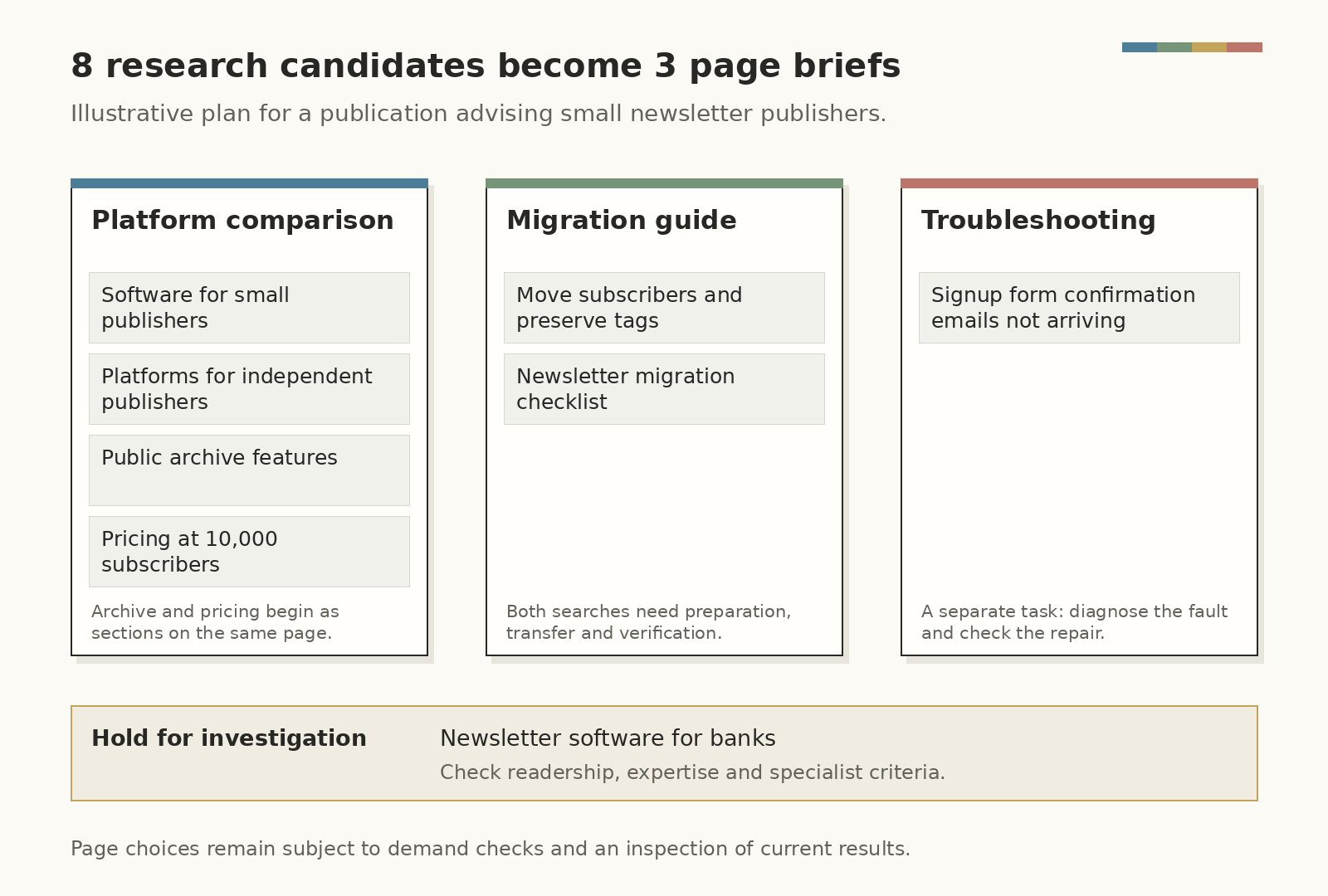
Consider a teaching example: a publication advises small newsletter publishers. Assume its reader correspondence contains recurring questions about choosing platforms, migrating lists and fixing signup problems. It has no relevant pages yet and no experience evaluating software for banks.
The following phrases are illustrative candidates. The proposed page plan still needs demand checks and an inspection of the current results.
| Candidate query | Proposed treatment | Research the page needs |
|---|---|---|
| Best newsletter software for small publishers | A platform comparison | Relevant selection criteria, current plans and documented product checks |
| Newsletter platforms for independent publishers | The same comparison | Check whether “independent” changes any requirements |
| Newsletter software with a public archive | A substantial section in that comparison initially | Published examples, access conditions and plan eligibility |
| Newsletter software pricing for 10,000 subscribers | A cost section in the comparison initially | Comparable billing periods, contact rules and sending limits |
| How to move newsletter subscribers without losing tags | A migration guide | A workflow for named source and destination platforms, field mapping and checks after import |
| Newsletter migration checklist | The same migration guide | Preparation, transfer and verification steps |
| Newsletter signup form not sending confirmation emails | A separate troubleshooting guide | The relevant platform and form setup, diagnosis and a completion check |
| Newsletter software for banks | Hold while investigating the audience | A relevant readership, appropriate expertise and bank-specific evaluation criteria |
The publication now has three pages to plan, with archive and pricing sections inside the comparison. Further investigation could justify separating either section. For example, an archive comparison may need different product checks and examples from a general platform roundup, while the current results may show a distinct demand for that treatment.
The migration guide has a different job from the comparison. Its reader has a list to move and needs to preserve information. Recommendations about which platform to buy would leave the transfer problem unresolved.
Name both platforms in any tested migration walkthrough so readers can tell whether it applies to them. A general checklist can explain what to prepare, while the walkthrough shows the actual export, import and verification steps for that transfer.
For the archive section, write down exactly what the researcher must establish: what a published issue looks like, whether it opens without an account, how old issues are organized and which plan supplies the feature. Screenshots and links to public examples should support those findings. Clearly distinguish documentation-based checks from steps someone actually performed.
That level of detail also helps when the topic changes. An ecommerce shop researching a desk for a narrow space may need an appropriate product collection with verified widths. A local cargo-bike repair search needs service-area and bike-acceptance information. Each query suggests a different kind of evidence and page.
Check your own archive before commissioning anything. An existing comparison may need an improved section. A useful migration guide may need a missing verification step. Where pages substantially overlap, examine their content, search queries and intended audiences before deciding whether to combine them.
Google’s spam policies cover doorway pages and the production of large amounts of low-value content to manipulate rankings. Keep that in mind before turning every audience modifier or location into another near-identical page.
How AI search affects long-tail research for 2027
Google documents that AI Overviews and AI Mode may use “query fan-out”: multiple related searches across subtopics and data sources while developing a response. A detailed question can therefore lead to research beyond the words the user originally entered. Google’s AI-features guidance describes that process.
For illustration, someone might ask for a newsletter platform suitable for a small paid publication whose older issues should remain publicly accessible. Investigating that request could involve paid-subscription features, archive access and contact-based pricing. This is a teaching example of the questions involved, rather than an observed trace of Google’s searches.
For the publisher creating a comparison, those are substantive requirements to investigate together. A list of variations on “best newsletter software” would leave most of the decision unexplained.
Write the findings so readers can understand each one: name the product and plan, explain the condition, show the supporting evidence and date any changing information. Give an archive section enough context that a reader arriving there can understand what was checked.
Google’s guidance says pages need to be indexed and eligible to appear with a snippet to qualify as supporting links in its AI features. It specifies no additional technical requirements or special optimization, and inclusion remains uncertain. Plan around useful, verifiable coverage as you prepare for 2027, then measure where it actually appears.
Put the research into a page people can use
Choose a title that describes the task and its important condition. A migration guide should make clear what is being moved and what the instructions help preserve. Open with the answer or starting requirement, then develop the explanation in the order the reader needs it.
For the newsletter comparison, keep archive examples beside the archive assessment and pricing assumptions beside the cost calculation. A reader should be able to inspect the basis for a recommendation while reading it.
Use the language your audience recognizes, including the relevant query where it fits naturally. Google’s Starter Guide recommends descriptive titles, readable content and useful links; it also warns against keyword stuffing. An exact-match quota would add repetition without supplying the missing product evidence.
Link related pages where the next task arises. A platform comparison can link to migration instructions when discussing switching. A migration guide can refer readers to relevant signup troubleshooting when explaining its final checks. Add links from appropriate existing pages so the new work is discoverable.
Before treating low traffic as a keyword problem, check that the intended URL is indexable and inspect its status in Search Console. Discovery and indexing need attention alongside the editorial work.
Measure the page and the related queries together
Keep a record of the intended query group, target page, publication date and substantive changes. Compare suitable periods with the same country and device settings, allowing for seasonality. Sparse data may require a longer observation period before a comparison becomes useful.
Use query-level data to understand the searches and page-level data to assess the work as a whole:
| What to inspect | What it helps you assess |
|---|---|
| Relevant queries receiving impressions | Whether the page is appearing for the needs it was built to address |
| Clicks and click-through rate for those queries | Whether appearances are producing visits, interpreted alongside the results and position |
| Page-level search clicks | The page’s wider search performance, including traffic beyond a short tracked list |
| Intended outcomes after arrival | Whether visitors subscribe, enquire, try a product or complete another relevant action |
| More than one page appearing for related queries | Whether those pages serve distinct tasks or need closer examination for overlap |
Average position can shift as the mix of queries changes. Inspect the relevant query group before concluding that a movement in the page-wide average means a particular keyword gained or lost rank.
Google reports traffic from AI Overviews and AI Mode within Search Console’s Web performance data. To check a particular AI appearance, keep a separate observation with the query, date, location and cited page. That records what appeared in that check, while the page report helps you follow traffic over time.
Start your first review with an existing page and a small group of relevant searches. Read what those visitors need, identify the evidence the page lacks and make a specific improvement. Record the change so your next review can examine what happened afterwards.
Start the conversation by posting the first comment