Google Analytics Enables Advanced Segment Tracking for Events
If you have events set up to be tracked in Google Analytics, you can now view advanced segments to view traffic data related specifically for the events. To make it happen, first, define an advanced segment to show only traffic from events. Then, activate the defined segment to compare event traffic to overall traffic.
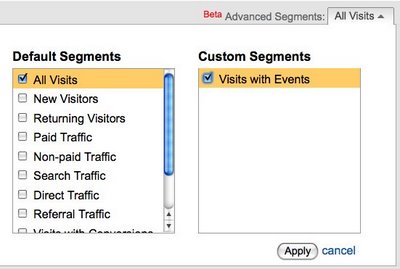
Image via Google Analytics blog
You can view as many segments as you are tracking for events.
Google created a handy video for setting up the advanced segment tracking for events. Check it out below:
More about:
The Merkle B2B 2023 Superpowers Index outlines what drives competitive advantage within the business culture and subcultures that are critical to success. It is the indispensable guide for B2B marketers to deliver world-class experiences and keep pace with the dynamic environment. Download Now
The ClicData survey found that various challenges exist that prevent organizations from achieving such gains. These challenges included inaccessible data formats and limited flexibility in displaying data in dashboards. Download Now
The need for fraud prevention in the digital world is critical now more than ever. Why? Thinking about your own behavior, consider how you complete transactions and how this has changed over the last 5 years. Download Now
The need for fraud prevention in the digital world is critical now more than ever. Why? Thinking about your own behavior, consider how you complete transactions and how this has changed over the last 5 years. Download Now
Leave a Reply
You must be logged in to post a comment.