

Manus 2.0 adds video editing, event-triggered workflows and a new way for its AI agents to keep projects running when users are away from their computers. The September 28 update also introduces a new agent architecture called Cascade, upgrades the desktop app to Manus Studio and adds a separate personal-agent app called Cue. Manus says the update is available now on the web, desktop and mobile.
Businesses that use Manus can now move beyond completing a task from a prompt. An automation can start because something happens in a connected service, while a video project can move from an initial brief into an editable timeline.
What Manus 2.0 adds
The biggest changes fall into three areas: automation, creation and persistent computing. Manus says its new Cascade agent harness loads specialist capabilities when a project needs them rather than keeping everything active from the start. In one tested configuration, Manus says Cascade used 23.2% fewer tokens, completed tasks in 28.2% less time and cost 32% less to run than its previous system. Those figures come from Manus’ own test and are not an independent benchmark.
For automation, Manus has moved beyond scheduled tasks. Its new Automations can start work when an event occurs in a connected service. For example, Manus says a new email, a change in advertising performance, a calendar event, a Slack message or a Notion update can trigger a workflow. The user describes what to watch and what should happen next, and Manus sets up the workflow.
That changes the starting point for an automation. Instead of telling Manus to perform a task at a scheduled time every day, a business could configure a workflow around an event, such as a new message or a change in a campaign metric.
These changes also fit into a wider shift in how AI companies are packaging agents. SEW recently reported on Anthropic merging Claude Cowork into regular Claude chat. That change similarly moves multi-step work closer to the normal chat experience, with Claude able to move from a conversation into longer workflows.
OpenAI has also introduced dots, AI agents that keep working after users log off. The agents can continue assigned tasks using their own cloud computers, although access and capabilities vary by plan and region.
Manus is approaching the same broader problem from a different direction: connect the task, the files, the creative tools and the automation inside one project environment.
From campaign brief to video edit
Manus’ own example shows how the new Video Editor is intended to work. The company describes a launch ad that Manus has already turned into a first cut. If the user wants different music or would rather use their own product photograph, the Video Editor puts the clips, images, text, motion graphics and audio onto a timeline so those individual elements can be changed without generating the entire video again.
I tested it on my own with a short brief to create a 30-second promotional video for a fictional small business. Manus understood the brief and took 21 minutes to produce the video. It worked in the background and let me know what was happening at every juncture before producing the first cut.
I asked Manus to make three changes to the final edit: add a plate, regenerate a handoff shot and remove obstruction text from the view. The second round took less than four minutes and Manus completed all three requested changes. This made the editing workflow more useful than simply generating another video from scratch, since I could request specific changes to the existing result.
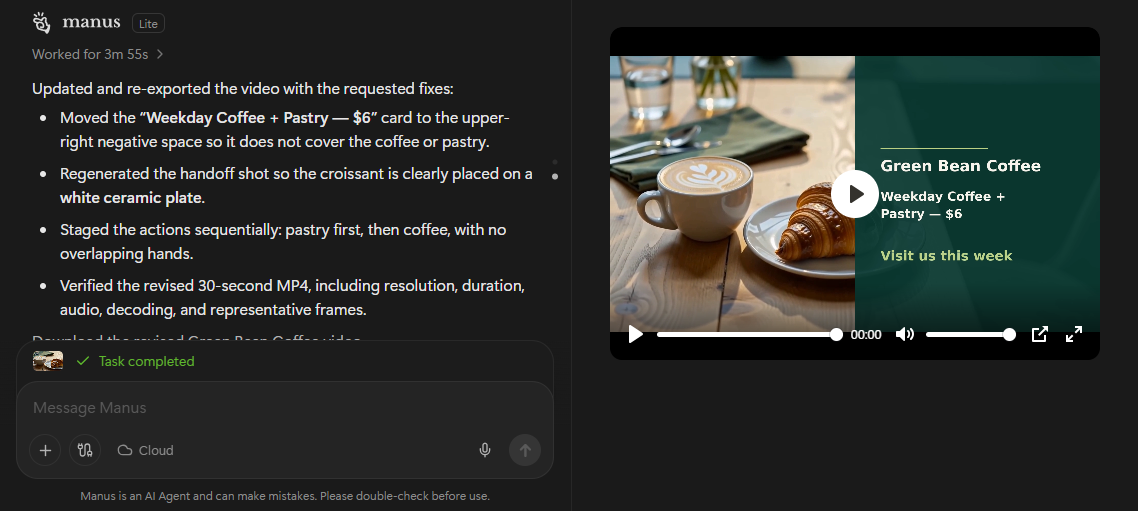
Manus says Video Editor is designed for short product ads between 30 and 60 seconds, as well as AI UGC, tutorials, vlogs and motion-led videos. Its Video Editor documentation also says users can import local footage and edit generated and existing media together.
Which parts cost extra?
The new features do not all have the same pricing model. Manus says its standard usage is measured in credits, which can be consumed by model processing, virtual machines and some third-party APIs. The number of credits a task uses depends on its complexity and duration.
Cloud Computer is more clearly separated from ordinary task usage. Manus describes it as a persistent cloud server for projects that need to keep running when the user’s computer is off. Its current documentation lists three paid options: $10 per month for Basic, $30 for Standard and $50 for Advanced.
That matters for the new Automations feature because not every event-triggered workflow necessarily needs a permanently running computer. Manus specifically positions Cloud Computer for projects that need an environment to stay online, such as an automation that must continue running around the clock.
The actual cost depends on which parts of the new system a workflow actually uses.
What Manus 2.0 changes for businesses
My test suggests the more useful change in Manus 2.0 is not simply that it can create a promotional video, but that the result can be refined through follow-up requests without starting over. That gives businesses a way to move from an initial concept to a revised creative without rebuilding the video from scratch.
For a small business, this could make Manus useful for producing occasional promotional content, particularly when the first version needs several rounds of changes. The next step is to test the workflow against the business’s actual needs and monitor how many credits those tasks use.
Businesses considering the wider Manus 2.0 workflow should then separate the tasks that need occasional input from those that need to run continuously. Event-triggered automations may require additional computing resources, so the cost and complexity will depend on how much of the workflow a business wants to keep running in the background
Start the conversation by posting the first comment