


Google is testing a new design for the table-style follow-up questions in AI Mode. We recently covered the earlier version, where AI Mode showed a table asking the user to select what they want and submit an answer, and then generated a new query within AI Mode.
In the new design, the table works a bit differently. When a user clicks a suggestion in the table, a blue arrow button appears below it. Clicking the arrow generates a new query within AI Mode.
Here is a screenshot of how it looks.
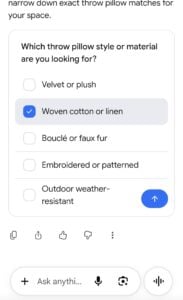
Here is a video of this behavior.
The new design looks easier to use. In the earlier version, I had to answer around three questions in the table before AI Mode generated a new query. In this version, I only had to tap one suggestion and then the arrow to get an answer.
Start the conversation by posting the first comment