


Google AI Mode is showing a new “Source preferences” button below the cards in the citation panel. Clicking it shows all the websites a user has selected as preferred sources.
This was first spotted by Damien Andell, who posted about it on X. He wrote that you can now access “Source preferences” directly in AI Mode to manage your preferred sources.
Here is a screenshot of this.
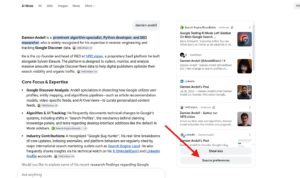
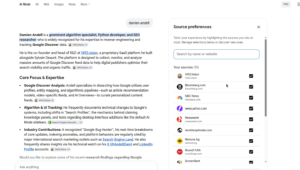
This looks like a useful addition. Within AI Mode, users can now add or remove preferred sources and see results from those websites without leaving the experience. Previously, they had to manage this through a separate preferences page.
We covered Google Preferred Sources feature earlier, including how site owners can send users straight to the source preferences tool.
Start the conversation by posting the first comment