

ChatGPT is now showing coupon codes directly in its answers, with a button to copy the code. Glenn Gabe posted about this recently, and I was able to replicate it myself.
He wrote: “ChatGPT can publish coupon code cards directly in the answer with ‘copy code’ buttons. That basically cuts out the coupon code websites completely (where it was surfacing some/most of the coupons). For retailers, it’s providing codes directly from them, so that won’t hurt them really. But the coupon code websites will NOT be happy about this.”
Here is a screenshot I took.
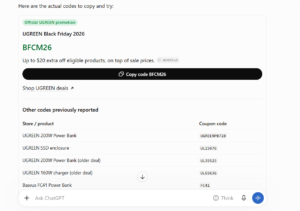
The coupon appears in a special card. The code is shown in large green text, with a long black “Copy code” button below it. Because the code is so easy to see and copy, I think users are more likely to actually use it.
Start the conversation by posting the first comment