ChatGPT shows a popup asking Chrome users to install its extension
ChatGPT is showing some Chrome users a popup that asks them to install an extension so ChatGPT can help with tasks in their open tabs.
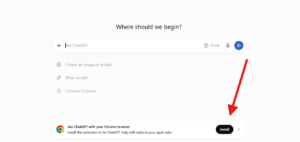
ChatGPT is showing a popup to some Chrome users that asks them to install its browser extension. The popup reads: “Use ChatGPT with your Chrome browser. Install the extension to let ChatGPT help with tasks in your open tabs.”
Here is a screenshot of how it looks.
I don’t know whether this is new or has been around for a while, but it was the first time I had seen it. The extension appears to be aimed at letting ChatGPT work with a user’s open tabs, which could make it more useful for everyday tasks.
ChatGPT is showing logged-out users in Incognito a grey popup at the bottom of the page that asks them to log in or sign up to research questions, compare sources, and draft reports.
We compared eight AI search engines on one question: how quickly can you check what they tell you? Prices, source quality and a simple way to verify each answer.
Google is promoting its floating desktop search bar with built-in AI Mode directly on Chrome’s New Tab page, giving Chrome Canary users another way to access Google Search without opening a new tab.
Start the conversation by posting the first comment



Start the conversation by posting the first comment