

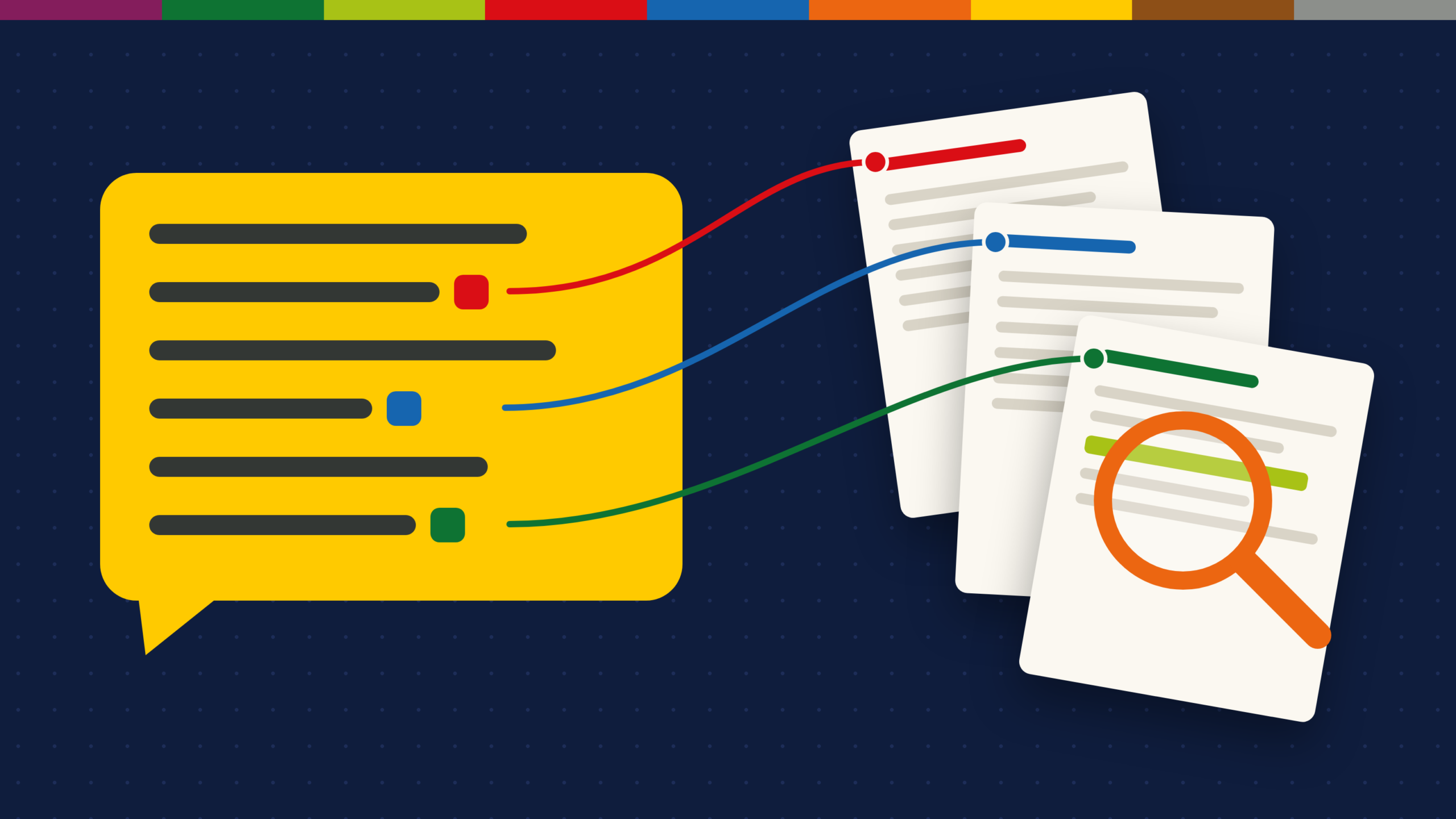
In a Tow Center for Digital Journalism test at Columbia University, eight AI search tools were given 1,600 quotes from news articles and asked to name the source. They got it wrong more than 60% of the time. Perplexity had the lowest failure rate, at 37%, while Grok 3 got 94% wrong and often linked to pages that did not exist.
That result does not make AI search useless for research. It means the tool you pick should make checking easy: every claim linked to a source, ideally the exact passage, and for academic work, a paper you can open and cite. Some AI search engines are built around that. Others still treat sources as a footnote.
Four things that make an AI answer checkable
Every tool here was compared on the same four points. Each one shortens the time it takes to confirm a claim.
- Inline citations: A numbered link next to each sentence, not one list of sources at the bottom.
- Quote-level evidence: The tool shows the passage it relied on, so you do not have to search the source yourself.
- Scholarly sources: Answers drawn from peer-reviewed papers, with titles, authors and journals.
- Context on each source: Signals such as whether later studies support or contradict a paper.
| Tool | Inline citations | Quote-level evidence | Scholarly sources | Source context |
| Perplexity | Yes | Partial | Academic focus option | No |
| Google AI Mode | Yes | No | Web sources | No |
| ChatGPT search | Yes | Partial | Web sources | No |
| Kagi Assistant | Yes | No | Web sources | No |
| Consensus | Yes | Yes | Peer-reviewed papers | Study details per paper |
| Elicit | Yes | Yes | 138 million+ papers | Extracted study data |
| Scite | Yes | Yes | Research papers | Supporting and contrasting citations |
| Semantic Scholar | Search engine | Paper summaries | 241 million papers | Citation counts and cited-by lists |
The pattern is clear. General AI search engines are fast and cover the whole web, while academic tools show their evidence in more detail. Most serious research uses one of each.
AI search engines for everyday web research
These tools answer questions from the open web. They work for market research, news, product comparisons and background reading.
Perplexity
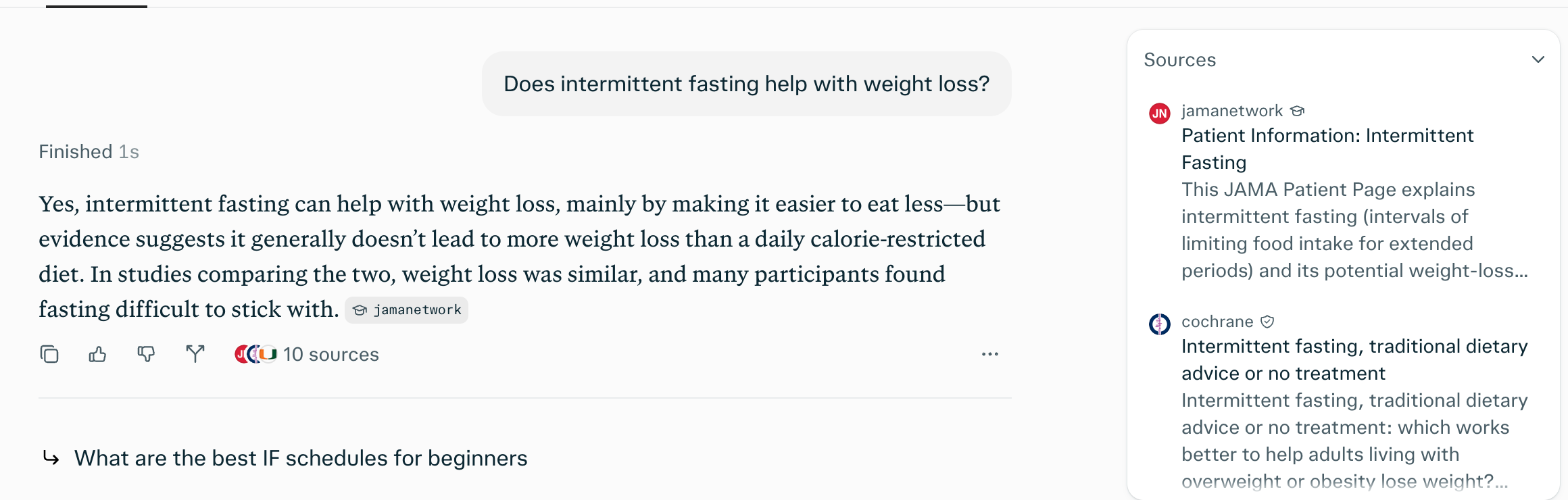
Perplexity was built as an answer engine with sources from day one. In the screenshot, it answers in a short paragraph and ends the claim with a source tag, here “jamanetwork”. The “10 sources” button under the answer opens the Sources panel on the right, which lists each page it read with the site name, the title and a short snippet. The first two are a JAMA patient page on intermittent fasting and a Cochrane review comparing fasting with standard dietary advice. Perplexity also had the lowest failure rate in the Tow Center test.
For deeper work, Research mode reads dozens of sources and writes a longer report, still with citations. An academic focus narrows answers to scholarly sources.
Price: Free with limited Pro searches. Pro costs $20 a month or $200 a year and adds unlimited Pro Search and 20 Research queries a day. Max costs $200 a month.
How to verify an answer: Open the Sources panel and check that the snippet under each source supports the sentence it is tagged to. Then open the page itself. If a source tag points to a general page and not to the claim, treat that sentence as unconfirmed.
Google AI Mode
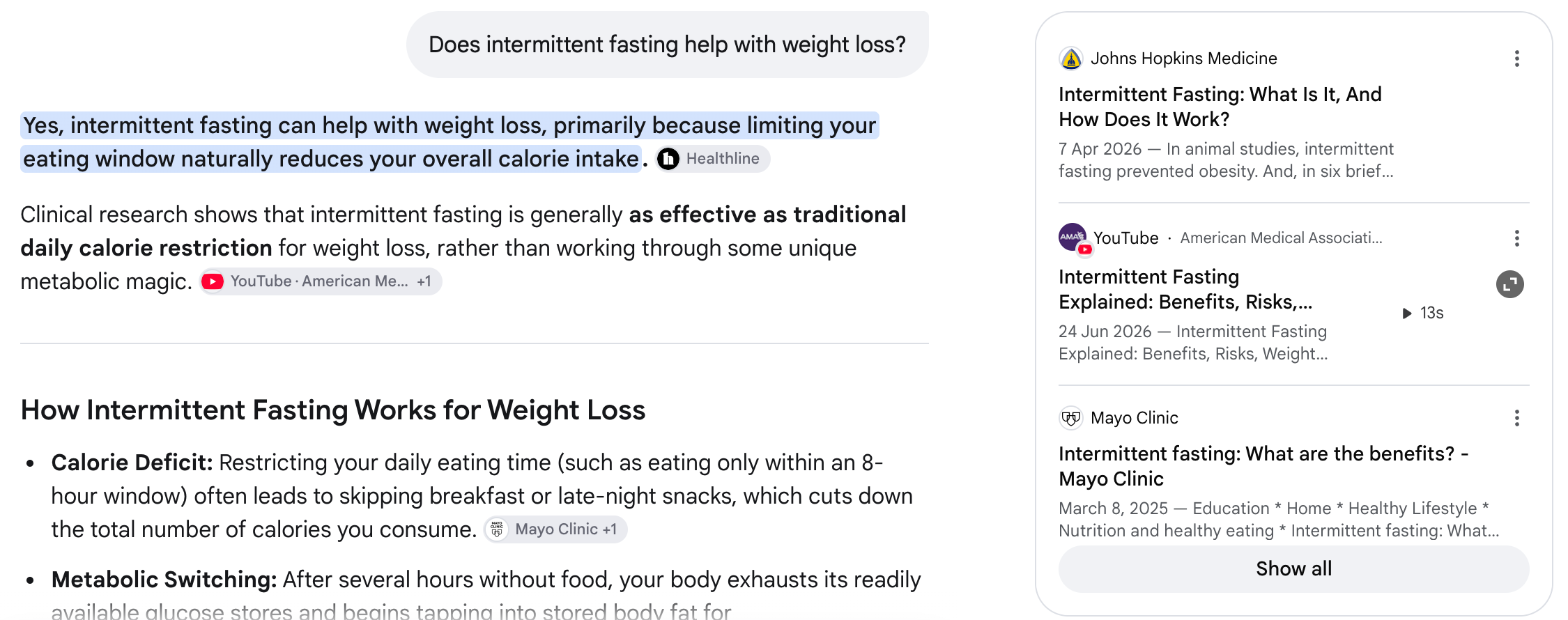
AI Mode turns Google Search into a conversation. It breaks a question into several searches, then writes an answer with links to the pages it used. In the screenshot, every sentence ends with a source chip, such as Healthline, “YouTube · American Medical Association +1” and “Mayo Clinic +1”, where “+1” means a second page backs the same point. On the right, a panel of source cards shows each page’s publisher, title and date, here Johns Hopkins Medicine, an American Medical Association video and Mayo Clinic, with a “Show all” button for the full list. Because it sits on top of Google’s index, it handles recent and local information well.
AI Mode itself is free. Google’s paid AI plans add Gemini Deep Research, which writes longer cited reports: AI Plus costs $7.99 a month with 12 reports a day, and AI Pro costs $19.99 a month with 20.
How to verify an answer: Click the chip at the end of the sentence you want to use. When a chip shows “+1” or more, open each page, because the chip covers several sources at once, and check that the specific number or claim appears on at least one of them.
ChatGPT search
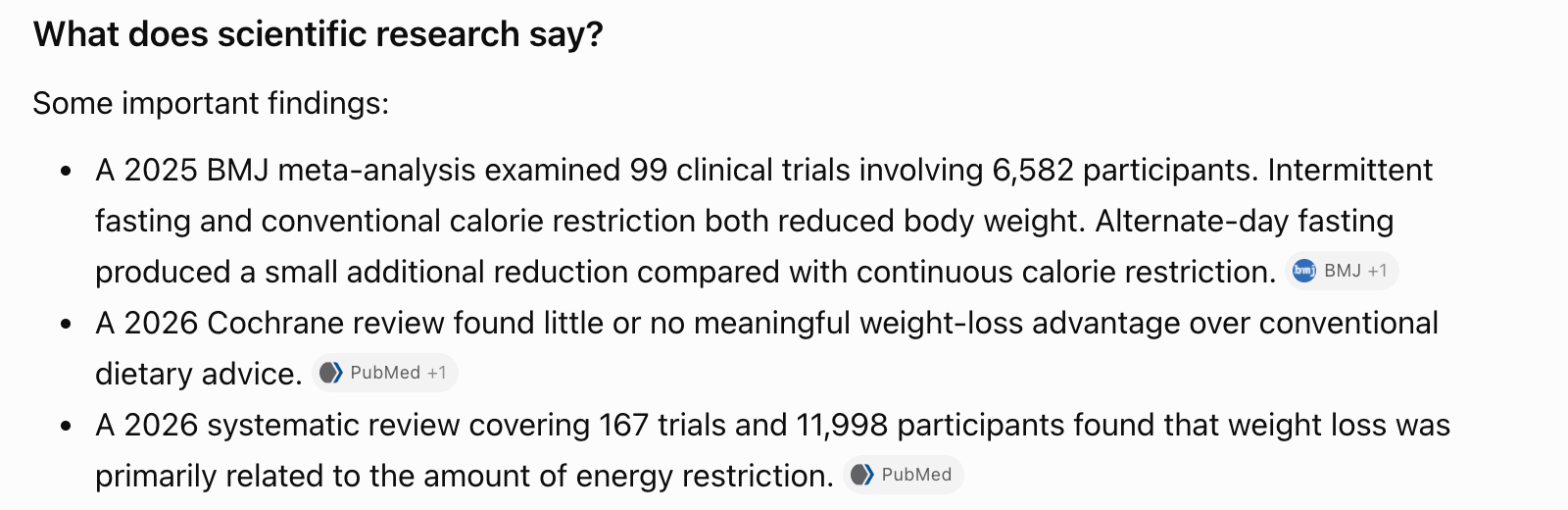
ChatGPT searches the web when a question needs current information, then adds a citation pill to the end of each sentence that uses a source. In the screenshot, its “What does scientific research say?” section lists three findings, and each ends with a pill naming where it came from: “BMJ +1”, “PubMed +1” and “PubMed”. Clicking a pill opens a small card with the paper’s title, journal, date and first author, so you can see the exact study before you leave the chat. A Sources button at the end of the answer lists everything it read.
Search is available on the free plan. Deep research, which builds a longer report from many sources, comes with paid plans such as Plus at $20 a month.
How to verify an answer: Click each pill and compare the paper in the card with the sentence it supports. In the Tow Center test, ChatGPT search gave 134 wrong citations and hedged in only 15 of them, so a confident tone is not a sign of accuracy.
Kagi Assistant
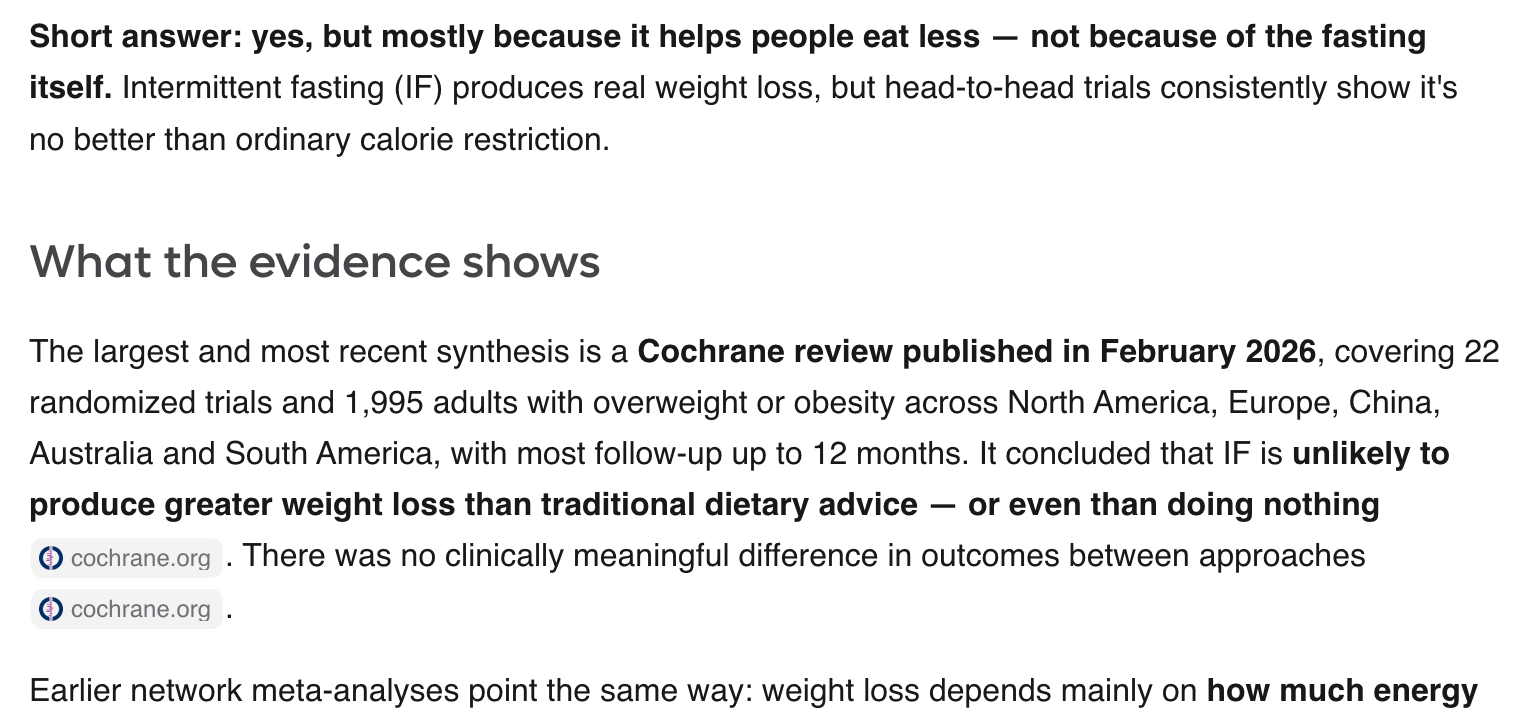
Kagi is a paid, ad-free search engine, and its Assistant answers questions using Kagi’s own search results. In the screenshot, it opens with a bold one-line answer, then explains the evidence under a heading. Each claim ends with a chip naming the site it came from, here cochrane.org for the Cochrane review and pubmed.ncbi.nlm.nih.gov for the earlier meta-analyses, and a References list at the end of the answer collects every source in one place. Because Kagi lets you block or boost domains, you can also keep low-quality sites out of the answers, which no free AI search engine offers.
Price: Starter costs $5 a month for 300 searches. Professional, at $10 a month, adds unlimited search and the Assistant with standard models. Ultimate, at $25 a month, adds premium models.
How to verify an answer: Read the domain on each chip first. A claim backed by cochrane.org or a journal is easier to trust than one backed by a blog, and domain rules let you raise trusted sources so they appear first in both search results and Assistant answers.
AI search engines for academic research
These tools search scientific literature instead of the open web. They are the right choice for literature reviews, health questions and any claim that needs a peer-reviewed source.
Consensus
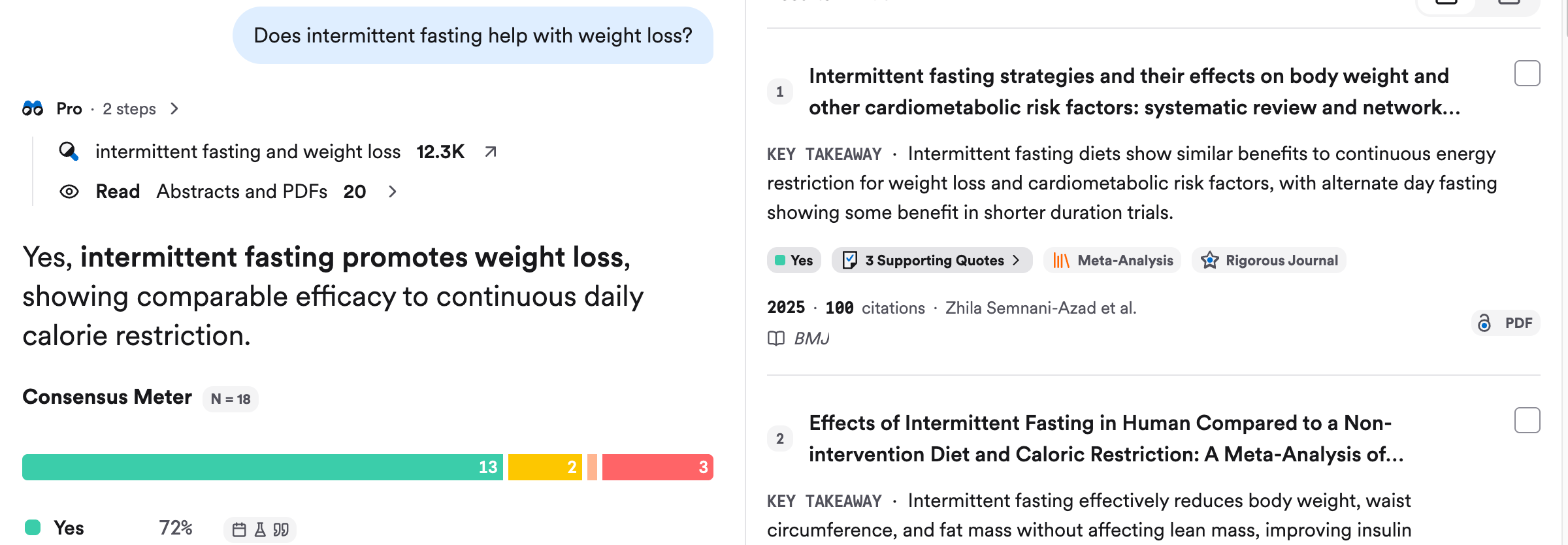
Consensus answers research questions directly from peer-reviewed papers. In the screenshot, it shows its working at the top, the number of results it searched and the 20 abstracts and PDFs it read, then gives a one-line answer. The Consensus Meter under it counts how the top 18 papers answer the question: 13 point to yes, and the rest are split between possibly and no. On the right, each paper in the reference list carries a key takeaway, a “Yes” tag, a link to its supporting quotes, its study type, such as Meta-Analysis, and its year, citation count and journal.
Price: The free plan includes 10 Pro messages and up to 3 Deep reviews a month. Pro costs $20 a month or $12 a month billed yearly, with unlimited Pro messages. Deep costs $65 a month or $45 billed yearly and includes 15 Deep reviews.
How to verify an answer: Read the meter, then open “Supporting Quotes” on the two or three papers at the top of the list. Check the study type too. A meta-analysis or randomized trial counts for more than a small observational study.
Elicit
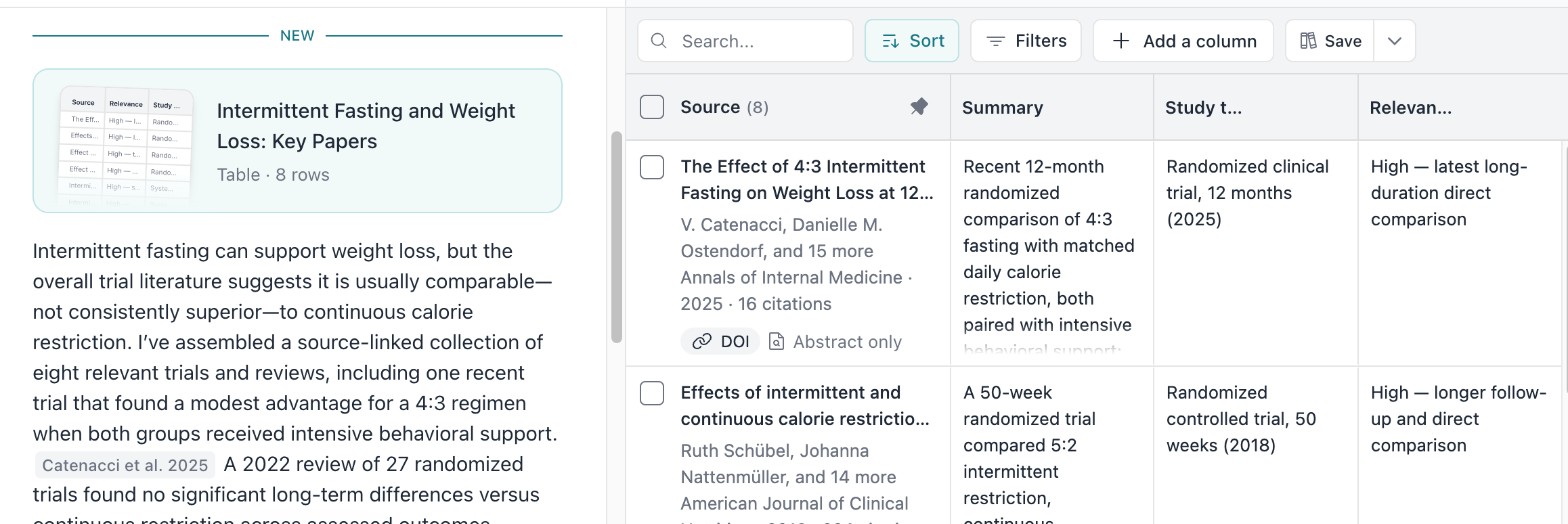
Elicit searches more than 138 million papers and turns what it finds into a table. In the screenshot, the answer on the left cites papers by author and year, such as “Catenacci et al.” and “Wei et al.”, right after the sentences that use them. On the right, its “Key Papers” table lists 8 sources, each with its authors, journal, year, citation count and DOI link, plus columns for a summary, the study type and why the paper is relevant. “Add a column” lets you pull more details from every paper, such as sample size or main finding.
It also writes research reports and supports systematic review workflows, including screening thousands of papers.
Price: The Basic plan is free. Pro costs $49 a month billed yearly, or $75 billed monthly, and screens up to 5,000 papers. Scale costs $169 a month billed yearly.
How to verify an answer: Check the “Study type” column first, then open the DOI link for any paper the answer leans on. The tag under each source also tells you whether Elicit read the full text or only the abstract.
Scite
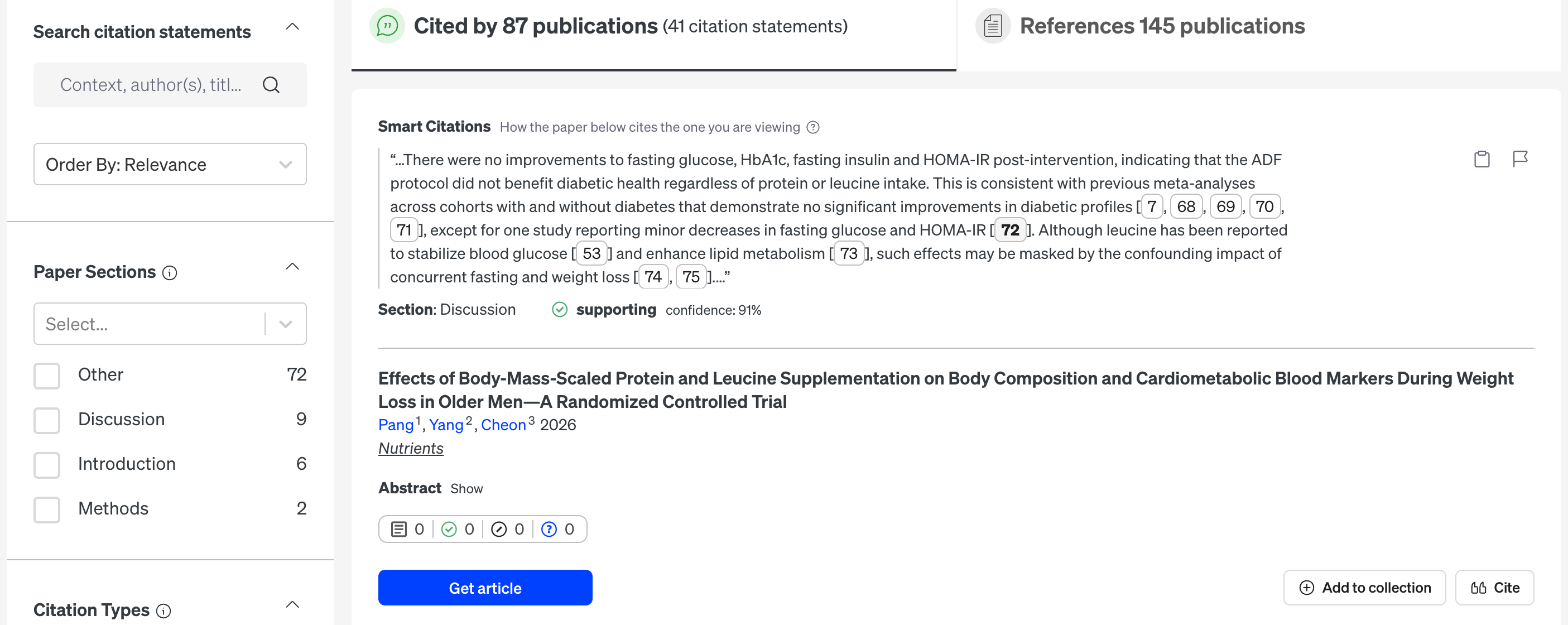
Scite answers a question no other tool here does: how has a paper been cited since it came out? The screenshot shows its report for the BMJ network meta-analysis on intermittent fasting. The header counts how many publications cite it and how many citation statements Scite found. Under “Smart Citations”, each card quotes the sentence where a later paper cites the study, names the section it appears in, here the Discussion, and labels it as supporting, contrasting or mentioning, here “supporting” with 91% confidence. The left sidebar filters statements by paper section and by citation type.
Its Assistant writes answers backed by those citations, and citation alerts flag new papers that cite a study you rely on.
Price: Basic costs $20 a month or $144 a year. Pro costs $50 a month or $480 a year and adds patents, clinical trials, grants and API access. New subscribers may get a seven-day trial.
How to verify an answer: Before you cite a key paper, open its Smart Citations report, filter by “Contrasting” in the citation types and read those statements first.
Semantic Scholar
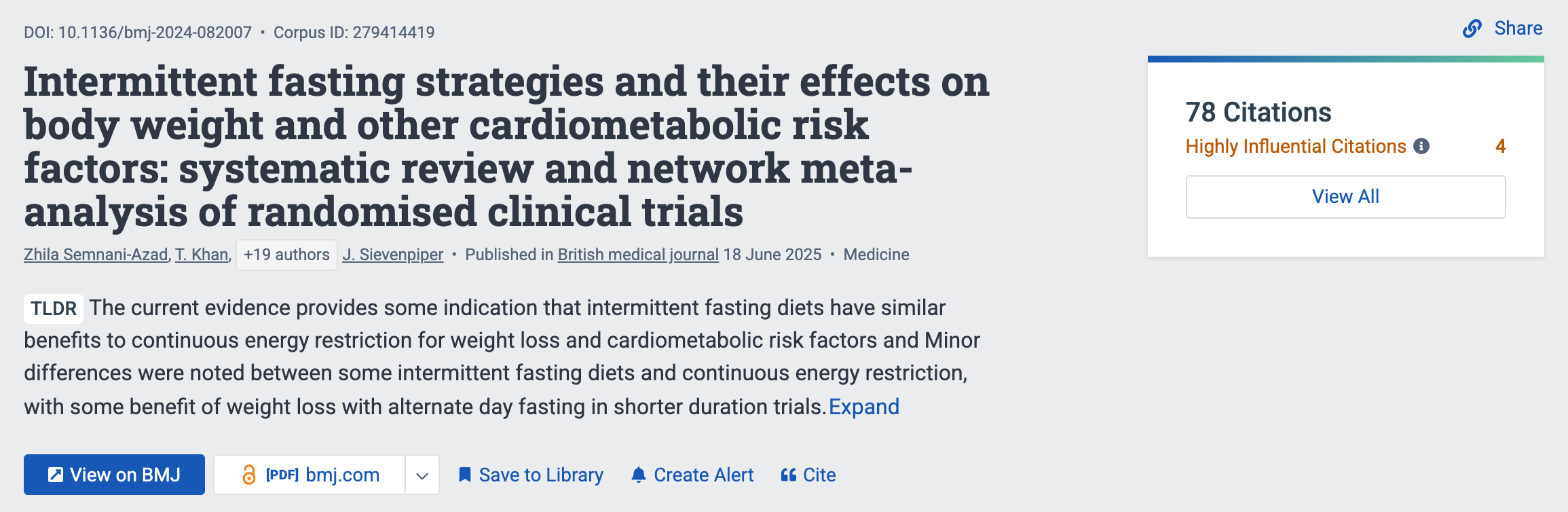
Semantic Scholar, from the Allen Institute for AI, is a free search engine for more than 241 million papers. It is not a chatbot. Instead, it adds AI where it saves reading time. In the screenshot, a paper page for the BMJ network meta-analysis shows a one-sentence TLDR summary written by AI, the DOI, authors, journal and publication date, and a box counting its citations, with “Highly Influential Citations” broken out. Buttons link to the publisher’s page and a free PDF, and “Create Alert” tells you when new papers cite it.
Price: Free.
How to verify an answer: Use it to confirm that a paper an AI tool cited exists, with the right authors, year and journal. Then open “View All” under the citations to see newer work that builds on it.
A verification workflow that uses two tools
Few researchers need every tool in this list. A practical setup pairs one fast web tool with one academic tool:
- Frame the question in Perplexity or Google AI Mode. Get a quick overview and a list of sources.
- Move the key claims to Consensus or Elicit. Find the peer-reviewed studies behind them.
- Check the most important papers in Scite. See whether later research supports or contradicts them.
- Confirm the details in Semantic Scholar. Check that titles, authors and years match before you cite.
This takes longer than trusting one answer, but each step only checks what the step before it found.
What each AI research stack costs
The cost depends on how often you research. These are three common setups, using yearly billing where offered:
| Setup | Tools | Monthly cost |
| Free | Perplexity Free, Google AI Mode, Semantic Scholar, Consensus Free | $0 |
| Light research | Perplexity Pro, Semantic Scholar, Scite Basic | About $29 |
| Academic | Elicit Pro, Scite Basic, Semantic Scholar | $61 |
For students and occasional users, the free setup covers most needs, because Semantic Scholar and Consensus Free both point to real papers. Paying makes sense once you run literature reviews every week.
Questions about AI search for research
Which AI search engine is most accurate?
No AI search engine is accurate enough to trust without checking. In the Tow Center test of eight tools, Perplexity had the lowest citation failure rate, at 37%. For academic claims, tools that answer only from papers, such as Consensus, Elicit and Scite, make each claim easier to check.
Is there a free AI search engine for academic research?
Yes. Semantic Scholar is free and covers more than 241 million papers. Consensus and Elicit also have free plans with monthly limits.
Can I cite an AI search engine in a paper?
Cite the original source, not the AI tool. Use the AI answer to find papers, then read and cite those papers directly.
What is the difference between Perplexity and Consensus?
Perplexity searches the whole web and covers any topic. Consensus searches only peer-reviewed research and is built for questions that need scientific evidence.
How do I check if an AI citation is real?
Open the link, search the page for the claim, and for papers, confirm the title, authors and year in Semantic Scholar or the publisher’s site.
Start the conversation by posting the first comment