Use Link: Search Command on Google to See 'Shared By' Results Per URL
Shared by results appeared in Google earlier this week and a number of people have asked how you get to see them. So, to clear up any confusion, here’s a very short explanation.
So far, I have only seen ‘shared by results’ in the news section of universal search results pages. When results appear in these results, a pale blue link to the right of the description displays the number of ‘shares’ of the page.

Click the link to be automatically taken to a Link:URL command in the updates section of Google. In the same way as you can look at inbound links to a page with the ‘Link:www.websiteURLhere.com’ you can now look at the number of shares for your website, by using this command on the updates section.
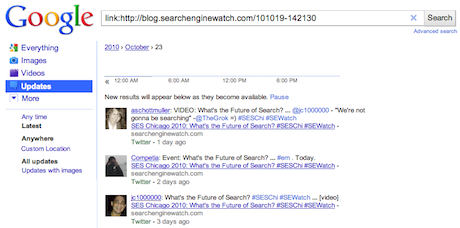
Usually this feature is not particularly accurate when looking at links to a specific page, but now you can use this command on any URL (‘Link:www.websiteURLhere.com/page-name’) rather than the entire domain, to see shares of that specific page.
Currently it only seems to index shares via Twitter but the results are surprisingly useful; it seems to surface users who quote or comment on the link in their tweets, rather than list everybody who simply retweeted the link. This could help you to more easily locate particularly engaged Twitter users within your community.
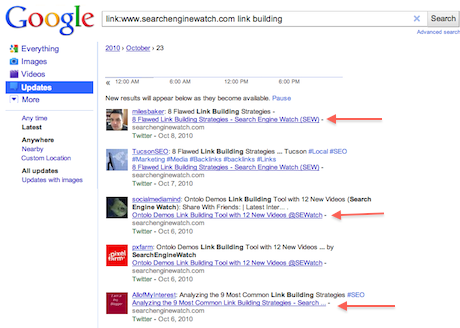
You can also use keywords with this command (Link:www.websiteURLhere.com + keyword query) to see shares on a specific topic from a particular domain. In the example above, 3 different pages about ‘linkbuilding’ were shown to be shared on Twitter in October. That could be a useful trick to find power users in other communities and fans of similar websites.
More about:
The Merkle B2B 2023 Superpowers Index outlines what drives competitive advantage within the business culture and subcultures that are critical to success. It is the indispensable guide for B2B marketers to deliver world-class experiences and keep pace with the dynamic environment. Download Now
The ClicData survey found that various challenges exist that prevent organizations from achieving such gains. These challenges included inaccessible data formats and limited flexibility in displaying data in dashboards. Download Now
The need for fraud prevention in the digital world is critical now more than ever. Why? Thinking about your own behavior, consider how you complete transactions and how this has changed over the last 5 years. Download Now
The need for fraud prevention in the digital world is critical now more than ever. Why? Thinking about your own behavior, consider how you complete transactions and how this has changed over the last 5 years. Download Now
Leave a Reply
You must be logged in to post a comment.