Google Bookmarks Goes Social [Visual Tour]
The social revolution at Google continues.
You can now create lists of your Google Bookmarks. Just go to google.com/bookmarks and when you’ve received the update, you’ll get a notification prompt:

Click the boxes next to the bookmarks and then use the drop down box to create a new list:

To find a list of your lists, look for “My Lists” on the left sidebar

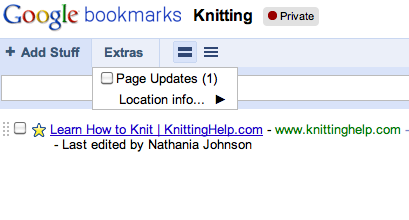
Click on the link to a list to manage it. What’s really cool is that Google tracks when a page gets updated:
To discover content shared by friends or the public, click on “Shared with me” in the left rail:

Of course, you can also search the bookmarks – not just yours, but public/shared ones as well.

This clearly goes after popular social bookmarking sites like Digg, Delicious, Reddit and StumbleUpon. It’s a far superior product than other social efforts by Google like Wave or Buzz. But it looks like they’re hedging their bets by calling the Lists “experimental.”
Leave a Reply
You must be logged in to post a comment.