

Have you ever made a change to a filter or other setting in Google Analytics only to wonder why months later? Do you have a team of people who have admin access to your site’s Google Analytics profile and want to better track who changed what and why? Your wish is Google’s command with Change History in Google Analytics.
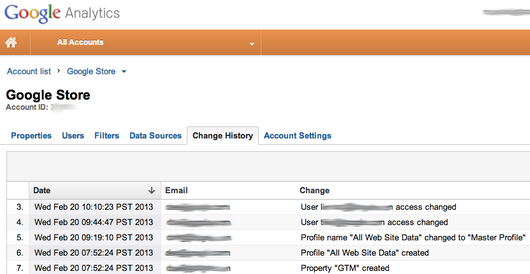
Change History keeps a historical record to the changes made to your Google Analytics account. As you can see from the screen capture, Change History records changes made to pretty much everything that happens in the admin area of your account: user changes and access, account settings, profiles, site properties, goals, filters and every Google Analytics admin function available.
In a simple table, Change History records the date and time the change was made, the profile user (email address) who made the change, and what aspect of your account was changed.
Change History is being rolled out to everyone over the next few weeks. If you don’t have it, watch for it coming soon to the Admin area of your Google Analytics account. The records only go back 180 days (3 months) and it is unclear if that information can be exported. Search Engine Watch has reached out to Google Analytics on what we can expect on both of those constraints.
Well overdue, this is great news for forgetful folks and agencies alike. How excited are you about this? Sound off in the comments.