

The Google Webmaster team is now notifying webmasters who are using an older version of the popular content management and blogging software WordPress. Apparently as early as last week, State of Search reports, users whose WordPress was out of date were receiving notices from the Google Webmaster Tools team stating as such.
What’s it to Google? Simply put, WordPress is the most popular off-the-shelf CMS. Its marketshare is vast.
According to their own count, WordPress claims they have over 47 million deployments worldwide. Previous versions of WordPress were known to have vulnerabilities that allow hackers to insert malicious files into an unsuspecting site. With such a wide base, it is imperative people keep their WordPress software up-to-date. Quality sites that don’t keep up with the latest releases are prone to attack.
If you have rreceived the “this site may harm your computer” warning, upgrading WordPress is a relatively simple process. Disable your plugins, do a back-up (just in case), and click the upgrade link.
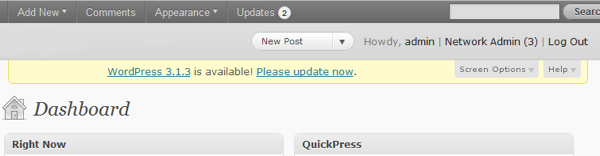
If you don’t know if you’re out of date, WordPress (v 2.7 and up) will tell you at the top of the screen in a bright yellow box. There’s also a button with the number of updates you have available in your top toolbar. If you don’t see either of these features, your version of WordPress is very old! Don’t ask, just update!
Don’t forget: updating your plug-ins is important, too. Just like WordPress, plug-ins that increase your site’s functionality, are upkept by the open source community too. If your site – or its plugins – are not up-to-date, your site may be susceptible to attacks.