


Gemini is the first tool I’d open to turn a business offer into social posts and newsletter copy. For a business that mainly needs to create visual posts and get them published, I’d start with Adobe Express: its free plan combines AI image generation, editable designs and social scheduling.
The other choices solve more specific problems. Google Pomelli builds campaign ideas around your brand, Clipchamp edits your own footage into videos, and Microsoft Clarity helps you investigate what visitors do after reaching your website. Pick the jobs you need help with from the table below.
| Tool | Where I’d use it | What you can use free | The limit that matters |
|---|---|---|---|
| Gemini | Drafting offers, social posts and newsletters | General AI assistance, Canvas and Gems | Usage varies; a fixed number of finished articles or posts is not guaranteed |
| Adobe Express | Making graphics and scheduling social content | Limited daily AI generations; ordinary design tools; 1,000 scheduled/published posts a month | One account per social network; the daily AI allowance is separate from scheduling |
| Google Pomelli | Generating campaigns with your business’s visual identity | Experimental access at no charge | Google describes several hundred image/video generations, without specifying a reset period |
| Microsoft Clipchamp | Turning existing photos and footage into short videos | AI auto compose and unlimited watermark-free exports up to 1080p | Auto compose is available in the personal-account version; premium assets can require payment |
| Microsoft Clarity | Reviewing landing-page visits and possible friction | Recordings, heatmaps and AI summaries | Requires installation and actual visitor data; summaries can misinterpret behavior |
We prioritized usable free access, a clear marketing job and a workflow an owner can manage alone. We checked official documentation and calculated allowances for an illustrative monthly workload; we did not test comparative output quality. Plans and US dollar prices were checked on September 28, 2026. Local prices and taxes can differ.
1. Gemini: turn your business facts into a weekly content batch
Start with the material you already know: what you sell, who it helps, the price, the offer’s end date and the questions customers ask before buying. Give Gemini those facts and ask it to produce the pieces you need for that week.
That is a manageable job for a general assistant. Gemini’s free plan includes Canvas, where you can create and revise a draft. Keep your campaign brief beside the draft so you can check prices, dates and booking details while editing.
Here’s a hypothetical brief for a bike repair shop:
We offer a £45 bicycle safety check covering brakes, gears, tyres and lights. Replacement parts cost extra. We are promoting appointments for October. Draft three social posts with different reasons to book, plus one 150-word newsletter. Use only these facts. Leave missing booking details in square brackets, and avoid inventing discounts, testimonials or urgency.
The three posts could focus on commuting, preparing for darker evenings and getting a neglected bike checked. You can then choose the angle that matches the customers you actually serve. Before developing an ad campaign, SEW’s guide to viewing competitors’ Google Ads for free offers a way to inspect the offers already in the market.
Gemini earns this place because you can draft and revise several formats in one application. If you already use ChatGPT or Claude for those drafts, keep your existing assistant.
Start on Free. Google’s US page lists Google AI Plus at $4.99 a month with higher usage limits. Consider it when the free limit repeatedly interrupts your writing sessions. Google’s usage guidance describes variable limits, so treat “12 posts and four newsletters” as a work plan, rather than a promised quota.
2. Adobe Express: create the graphics and schedule the posts

Adobe Express is the most practical choice here for a business starting its social content from scratch. You can make a graphic, edit its text and layout, then schedule it from the same application.
The Free plan includes limited daily image and template generations alongside ordinary editing tools. For the bike shop, that could mean using a real workshop photograph in a template, adding the £45 offer and creating a second version with a different message. AI-generated decorative backgrounds are optional; the photograph already shows what customers are buying.
The scheduler is the reason Express stands out in this comparison. Adobe documents 1,000 posts a month across connected networks, with one account per network on Free. Facebook, Instagram and LinkedIn are among the supported services. Twelve posts adapted for those three networks produce 36 placements, comfortably inside that allowance.
AI generation has a separate limit. Adobe does not publish a fixed daily quantity on its pricing page. If you exhaust it while exploring images, you can continue editing your own photos and existing templates. The monthly publishing allowance should not be read as 1,000 free AI-generated designs.
Premium costs $9.99 a month with monthly billing and no annual commitment. It adds 250 monthly generative credits, brand kits and one-click resizing. Resizing earns consideration when you repeatedly rebuild the same promotion for different formats.
Already have a working set of Canva templates? Keep using them. Express is our recommendation for this combination of free creation and scheduling, rather than a reason to rebuild an established design library.
3. Google Pomelli: generate a campaign around your brand
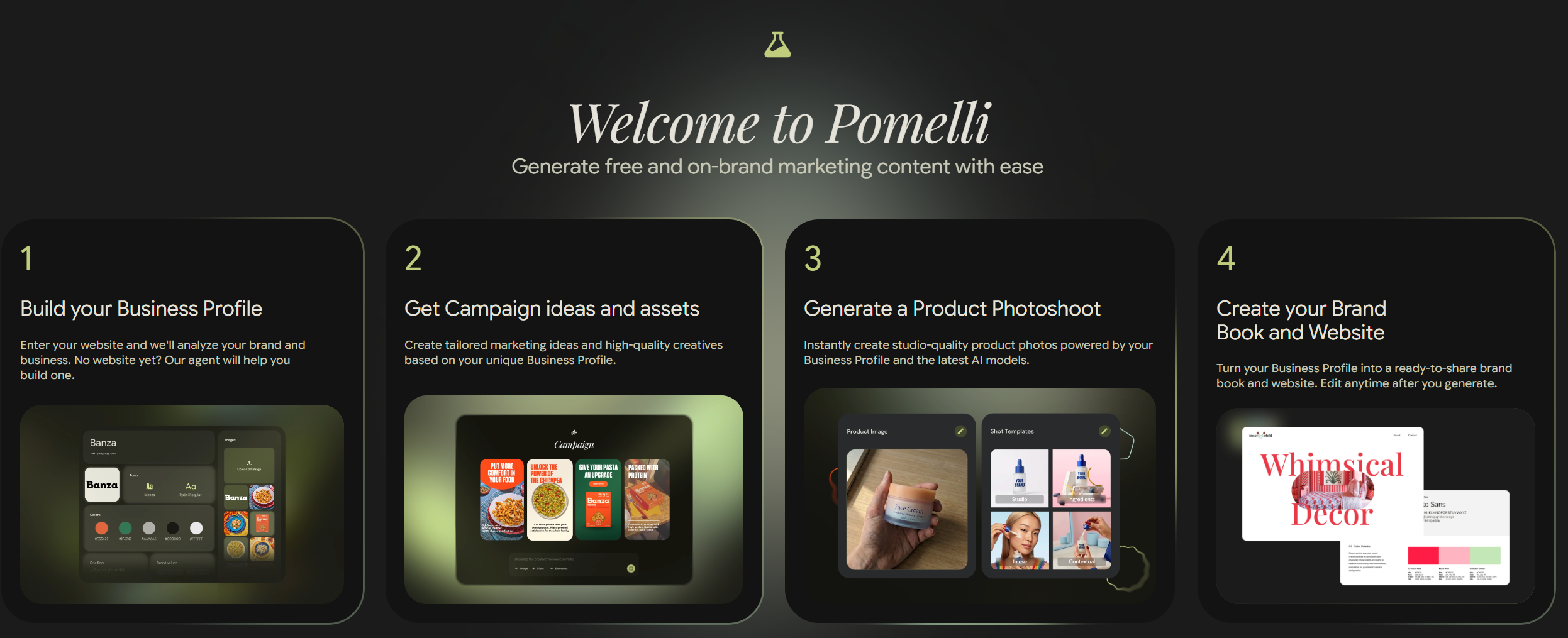
Pomelli is worth trying when the difficult part is getting several campaign pieces to look as though they came from the same business.
It builds a profile called Business DNA, covering details such as your fonts, colors, images and brand values. You can start from a website or supply material yourself. Review the profile before creating a campaign, particularly if your website contains old offers or services you no longer sell.
Pomelli uses that context to generate campaign creatives, which you can edit. For a small shop, the appeal is being able to start with a product and an existing visual identity, then develop several promotional treatments without describing the brand again in every prompt.
There is also a shorter route to publishing than its early launch coverage suggests. Pomelli can post directly to a connected professional Instagram account. It can share assets with Google Ads too, although you still launch the ad campaign inside Google Ads.
The substantial qualification is its experimental status. Google currently offers Pomelli at no charge and describes an allowance of several hundred image and video generations. Its help page does not specify when that allowance resets. I would use it to explore a campaign, while keeping the editable assets and publishing routine in tools I already use.
It is available in English to adults in supported countries, including the US, UK and Romania. Check generated product images against the originals: Google specifically warns that colors, logos and textures can change.
4. Microsoft Clipchamp: make short videos from footage you already have

A restaurant can film dishes coming out of the kitchen. A repair shop can show part of a job. A retailer can record a product being unpacked. Clipchamp’s AI auto compose takes that material and assembles a first edit.
You supply photos and video, choose a style and format, and review the result. The auto compose feature selects elements such as highlights, pacing, transitions and music. You can regenerate the draft or open its timeline to change the order, remove a shot and adjust the timing.
That makes it a useful choice when you have plenty of phone footage but keep postponing the edit. A 20-second workshop video can use real details of your premises and work, while AI helps with assembly.
Auto compose is free in Clipchamp for personal accounts. Microsoft says the feature is currently unavailable in the work and school version, so check which account you are signing into. The free personal plan allows unlimited watermark-free exports up to 1080p. Stay with your own footage and included assets for the free workflow.
Review the edit before exporting, especially the order of a demonstration, any names or prices, and the final booking details.
For four short videos a month, the export allowance provides ample room for revised versions. There is no need to buy a video-generation subscription merely to assemble clips you have already recorded.
5. Microsoft Clarity: investigate what happens after the click
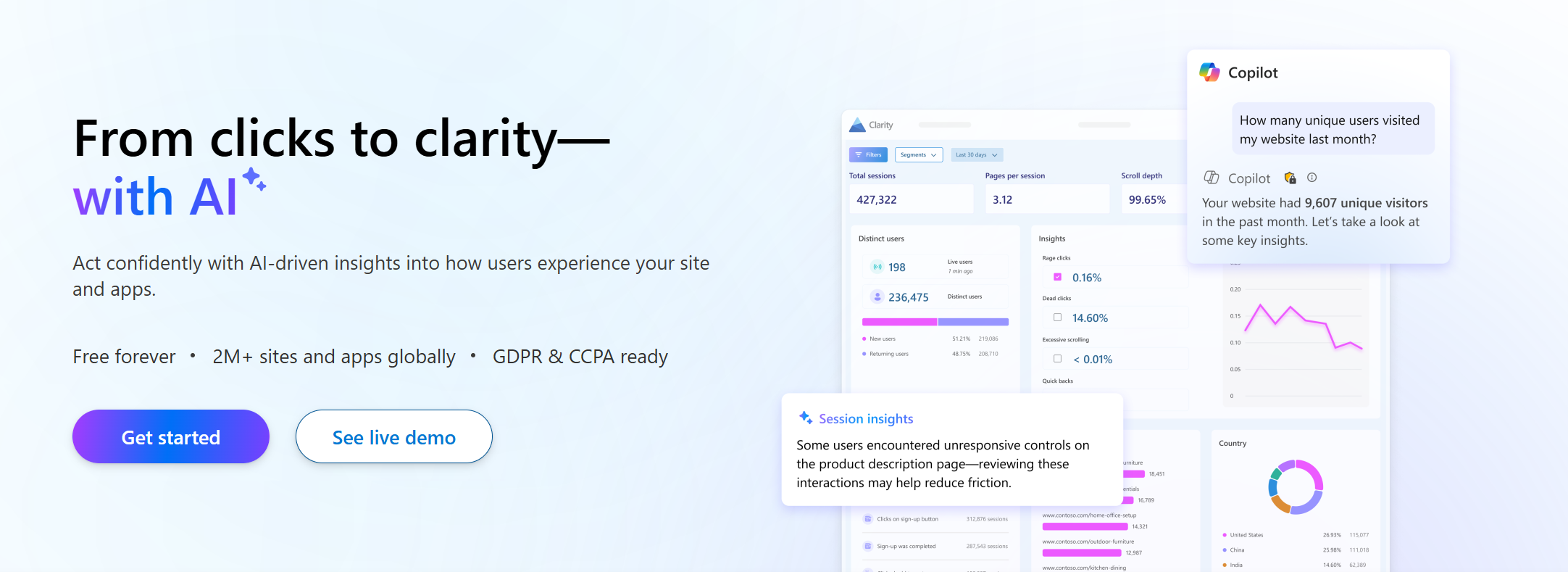
Clarity belongs in this list because a campaign continues after someone clicks through to your website. It gives you a way to inspect the page they reached and the interactions that followed.
After you install it, Clarity records visitor interactions and produces heatmaps showing where people click and how far they scroll. Its Copilot features summarize recordings and heatmaps, and Microsoft provides the service free.
Suppose your bike shop’s campaign links to a booking page. You could filter the recordings by that campaign, ask for a summary of a selected group and open the sessions behind a reported problem. Perhaps people repeatedly click something that looks like a booking button, or abandon a form at the same point. Those are hypotheses to investigate in the recordings and on the page.
Grouped Session Insights supports filters including campaign and device type, and lets you open recordings referenced by its summaries. It cannot summarize every recording in a project at once. Individual Session Insights also exclude visits shorter than five seconds.
You need traffic to analyze, installation access and an appropriate consent setup. Keep checking bookings or sales in the systems that record them; Clarity adds a closer view of interactions on the page. For search-performance work, see SEW’s separate guide to free AI SEO tools for small businesses.
What a month of marketing would actually require
Here is an illustrative workload for one owner: 12 social posts, four newsletters, four campaign graphics, four short videos and a weekly look at the campaign’s landing page. The graphics and videos supply eight of the social posts; the other four use existing photographs. Assume the business already has a website, a domain, real photographs and 500 opted-in email subscribers.
| Monthly job | Suggested route | Allowance and manual work |
|---|---|---|
| Draft 12 social posts and four newsletters | Gemini Free, working in weekly batches | Variable AI limits. You supply the facts, edit the drafts and approve the offers. |
| Make four campaign graphics | Adobe Express Free | Daily AI allowance is unspecified. Ordinary template and photo editing remain the fallback. Pomelli is optional for campaign exploration. |
| Publish 12 posts on three social networks | Adobe Express Free | 36 placements against a 1,000-post monthly allowance. Connect one account per network and check each format. |
| Produce four short videos | Clipchamp Free, personal account | Unlimited exports up to 1080p. Supply your own footage and review each edit. |
| Send four newsletters to 500 subscribers | Your existing email service, or Sender Free | 2,000 email sends. Paste the approved draft, format it, test it and schedule the campaign. |
| Review the landing page weekly | Microsoft Clarity | Free, with installation and visitor data required. Open relevant recordings before deciding what to change. |
Email delivery deserves its own calculation. If you need a service, Sender’s free plan currently includes 2,500 subscribers and 15,000 emails a month, with no daily sending limit and Sender branding. Four newsletters to 500 people use 2,000 sends; at 1,000 subscribers, the same schedule uses 4,000. Both fit, with room for additional messages. Connect and authenticate your sending domain before sending; the free plan supports this. Sender is the delivery service in this example; Gemini does the AI drafting.
The listed publishing, export and email allowances accommodate this workload at $0 in additional software subscriptions, provided you use the free assets and accept the variable AI-generation limits. Your website, domain, advertising and time sit outside that figure. This is a capacity calculation, not a tested promise that every first draft will be usable.
Our take: spend on the part that is slowing you down
For an owner starting from scratch, I’d set up Gemini and Adobe Express first. That covers writing, making graphics and getting social posts scheduled. Add Clipchamp when you have footage waiting to be edited, and Clarity when you have website visits to investigate. Try Pomelli for a campaign where maintaining a consistent visual identity is the difficult part.
The first paid upgrades have specific jobs. Google AI Plus at $4.99 a month increases usage when writing sessions keep stopping at a limit. Express Premium at $9.99 adds resizing and brand tools when repeated layout work is consuming your time. Buying both would cost $14.98 a month before any applicable taxes, at the US prices checked for this article.
Keep a record of published posts, email clicks and resulting enquiries or orders for your first month.
Start the conversation by posting the first comment