

Google recently announced it would soon add a Personalization icon below tailored AI Mode responses, so users can view the context used to personalize them. I’m now seeing the “Personalized for you” indicator and its accompanying side panel in AI Mode.
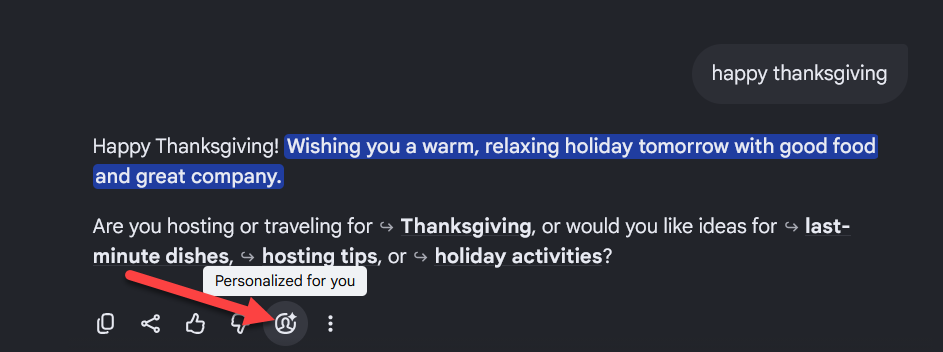
The indicator appears below an AI Mode response. Clicking it opens a “Personalized for you” side panel with the message, “Here’s what I used to personalize this response. Only you can see this.”
The panel includes a “Recent activity” section, explaining that personalized responses are based on the user’s Google activity. It also links to My Activity, where users can manage their history, and includes a “Try without personalization” option to get the response without personalization.
The panel also says, “Something not right? Let me know if anything needs to be updated,” letting users tell AI Mode when something needs to be updated.
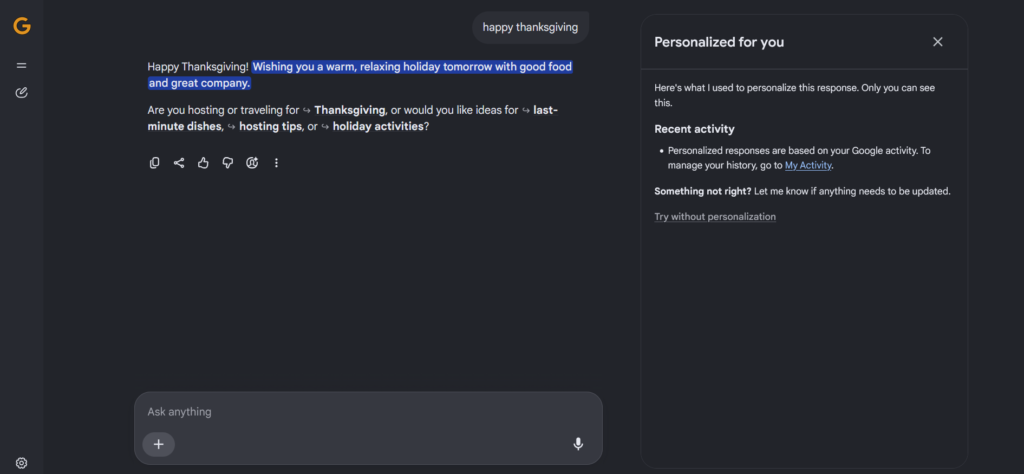
While Google said users would be able to view the context AI Mode uses, the panel currently provides a general explanation based on recent activity rather than listing the specific items used for the response.
I’m seeing the indicator and side panel in AI Mode, suggesting the feature is beginning to roll out. Availability may vary as Google makes it available to more users.
Start the conversation by posting the first comment