


If you’ve intentionally removed a page and have no replacement, Google says its 404 error doesn’t need fixing. Its expanded guidance reassures site owners that these responses won’t hurt their site’s overall indexing or rankings.
The update was first spotted by Marie Haynes. Google’s November 27 changelog says it consolidated advice from the Search Console Help Center into its crawling documentation.
Google explains why old 404s won’t use up your crawl budget
Google says already-crawled 404 URLs don’t meaningfully consume crawl budget or reduce crawl capacity. A 410 response, meaning gone, generally gets fewer rechecks, though Google treats both codes the same for indexing.
Its separate status-code guide explains why server errors deserve a different response. A 429 or a 5xx error signals server trouble, prompting crawlers to slow down. Persistent server errors can eventually cause indexed URLs to disappear.
Let Google see the error and help visitors find another page
Remove deleted URLs from your sitemap, but keep them crawlable. Blocking them in robots.txt prevents Google from seeing the 404 or 410 it needs to remove them from its index.
Google’s expanded guidance recommends redirects only for equivalent replacements. Sending people to an unrelated homepage or serving placeholder content can produce a soft 404.
A soft 404 can also occur when a server reports success with a 200 response while displaying an error or empty page. Google evaluates the content as well as the code, so a successful response doesn’t guarantee indexing.
For your error page, Google suggests matching your site’s design, explaining what’s missing, and adding search, popular-content links, a homepage link and a broken-link reporting option. Keep the actual 404 response.

Check whether a missing page was meant to disappear
An article that disappears after a site update needs a different response from a promotion you’ve deliberately retired. For the article, check whether its content still loads and whether the server returns the intended status code.
Google’s URL Inspection tool lets you compare stored crawl information with a live test and examine the rendered page. A successful test shows the current state, but cannot establish what Google saw during an earlier crawl.
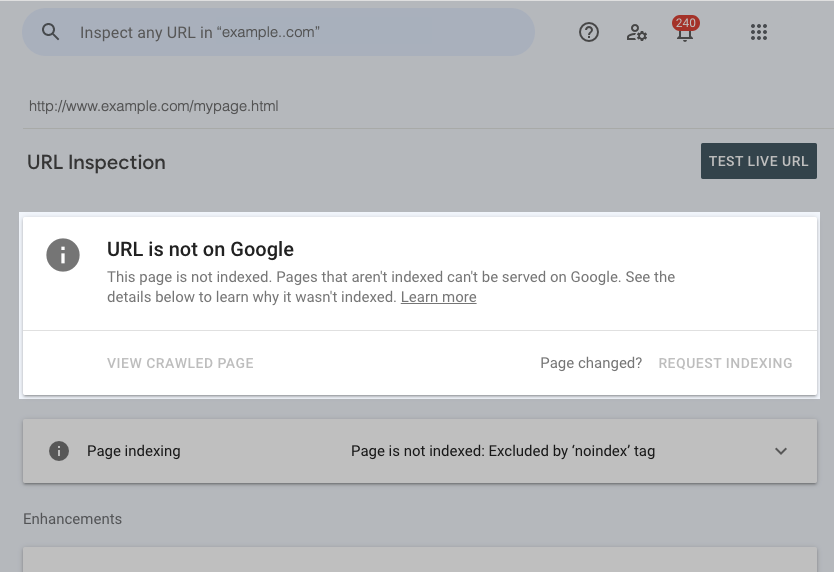
That helps separate a deliberate deletion from rendering failures that replace a page’s content with an error. Prioritize restoring material you still want people to read, then review removed URLs that keep bringing visitors from external links.
Source: Marie Haynes
Start the conversation by posting the first comment