


Microsoft Bing is displaying source links directly within its AI Overview, even though a separate reference panel is already available on the right-hand side.
In the example, the AI Overview provides an answer about different types of men’s wigs. Alongside the generated response, Bing displays a “Sources” section below the image carousel, including a reference to Wigs.com and an indicator for three additional sources.
However, these are the same references already listed in the panel on the right-hand side. The website names, page titles and URLs are identical in both locations.
Here is how source links appear within a Bing AI Overview.
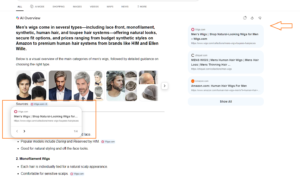
Clicking a source reference below the image carousel opens a preview window, where users can navigate between the available references. The right-side panel also provides access to these sources, including a “Show All” option to view more references.
This makes the additional Sources section somewhat redundant, as it repeats links that are already accessible through the existing reference panel.
Start the conversation by posting the first comment