

Microsoft’s adCenter is introducing Dynamic Text Insertion into its offering.
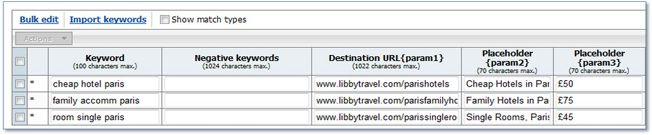
Similar to using {keyword} insertion, Dynamic Text Insertion works by using these placeholders: placeholders {param1}, {param2} and {param3}.
adCenter gave four tips on how it works:
- If submitting keywords via a spreadsheet – Dynamic Text should be placed in the ‘Dynamic Text {param2}’ column
- If submitting keywords via Microsoft adCenter click into the relevant ‘campaign’ and ‘ad group’ and then once you’ve reached the ‘keywords’ tab, click on the ‘edit keywords’ button./li>
- Alter {param1}, {param2} and {param3} as appropriate. The ‘Bulk Edit’ function can be used by ticking next to the keyword parameters you wish to edit and then clicking ‘Bulk Edit’.
- {param1} is typically used for destination URLs as it offers more characters with which to ensure the link is as detailed as possible. {param2} and {param3} can be used to include as much of the keyword and other engaging information (e.g. price points) as possible. The bulk editing function makes it really easy to update your dynamic text when required.

Related Reading:
Microsoft adCenter Updates Credit Card Options
Microsoft Unveils AdCenter Desktop Beta
adCenter Advertiser Blog Explains Keyword Match Types