Google's Holiday Gift: Product Listing Ads
Ready to try out the new AdWords Product Listing Ads? A guide to the key points advertisers should be aware of.
Ready to try out the new AdWords Product Listing Ads? A guide to the key points advertisers should be aware of.
As someone who has focused about 70 percent of their online marketing time on B2B, it’s always fun to get involved in a B2C project, especially one that’s e-commerce related. Over the past few years I’ve been able to work with a handful of accounts that fit this description nicely. The rush of seeing live dollars at work online is addictive to say the least.
Recently, one of our employee was asking questions about a new e-commerce PPC account she was assigned and the topic of Google Product Listing Ads came up. As the beta tests had been limited for a long time and the client wasn’t a Google affiliate, it seemed as if it would have to wait.
But not for long! Earlier this month Google revealed that they were expanding these product ads for all of their advertisers and just in time for the holiday season!
The key points that advertisers should be aware of with these ads are:
With a successful account (also running through Google Merchant Center), we were just given access to this expanded beta at the end of last week. No, we weren’t greeted by a welcoming e-mail or visit from one of Santa’s elves. Instead we found that we had a new “Auto Targets” Tab inside our AdWords account.

Clicking on the “Learn More” link doesn’t yield much help:

However, hovering over the Auto Targets Tabbed Tool Tip gives the advertiser a bit more info:
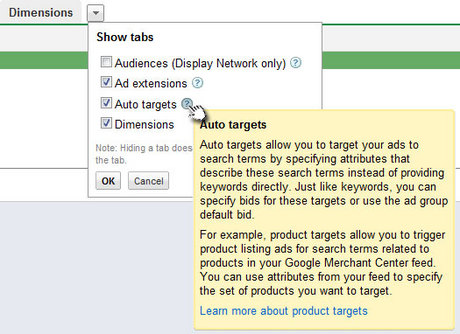
In doing a bit of digging around the AdWords Help Center, I found a few resources that aren’t linked to (currently) through your AdWords account:
If you think you have the differences down, have been recently included in the beta test, and are ready to try out your new found toolset, then set up is pretty straightforward.
Under the Auto Targets Tab, if you click on “+ Add product target” you’re given a selection of current campaigns and ad groups from which to choose:
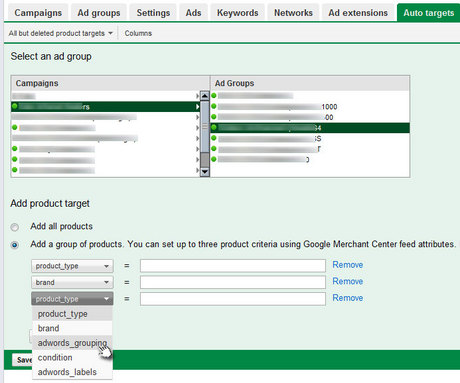
Your choice is to add All Products to the ad group of your choice, or you can be more specific and choose a group of products to display. These are based on up to three different criteria from your Google Merchant Center Feed. Your choices include:
If you need help fully understanding Google Merchant Center Attributes, try here.
Once you select your criteria, your new Product Ads will be added to your account. You may change the columns you see to include Conversions, etc. But other than reporting, the only thing you can change is the maximum CPC.
As this is so new I’m not able to report results yet. But if you were a lucky early adopter or can shed some light on anything you’ve learned, please share in the comments and I’ll happily update the post with the most recent information. Stay tuned for the results in my next column.
Leave a Reply
You must be logged in to post a comment.