AdWords Call Metrics Now Offers Deeper Call Reports
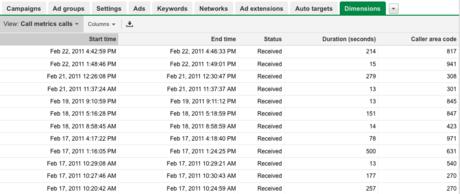
Google AdWords now shows more detailed reports on every call your campaign has received with call metrics enabled. This includes the call’s start time, end time, duration, status (missed or received), and area code.
AdWords call metrics, introduced in November, allows advertisers to track the number of phone calls an AdWords campaign generates.
To see the reports, enable the Dimensions tab, click “View,” and select “Call metrics calls.” You can still view number of calls, received calls, missed calls, total call duration, and average call duration by campaign under the Campaigns tab.
Call metrics availability remains limited for U.S. advertisers. You can request the feature here.
More about:
The Merkle B2B 2023 Superpowers Index outlines what drives competitive advantage within the business culture and subcultures that are critical to success. It is the indispensable guide for B2B marketers to deliver world-class experiences and keep pace with the dynamic environment. Download Now
The ClicData survey found that various challenges exist that prevent organizations from achieving such gains. These challenges included inaccessible data formats and limited flexibility in displaying data in dashboards. Download Now
The need for fraud prevention in the digital world is critical now more than ever. Why? Thinking about your own behavior, consider how you complete transactions and how this has changed over the last 5 years. Download Now
The need for fraud prevention in the digital world is critical now more than ever. Why? Thinking about your own behavior, consider how you complete transactions and how this has changed over the last 5 years. Download Now